In late November, Nous Research released v0.23.4 of its open-source Hermes Agent, followed by patch v0.23.5 on November 28. It's a major update: 229 pull requests and 281 closed issues since the previous version. Fresh models are in the mix, too, though the biggest shift is about control. The agent no longer runs like a black box: it now asks for approval before stepping outside its sandbox, taps into a vetted catalog of 2,600+ plugins, and displays every move on a live Panoptes map.
Official promo card for the open-source Hermes Agent by Nous Research (Source: hermes-agent.nousresearch.com)
What changed in Hermes Agent 0.23.4
If you've ever run an autonomous agent on your own computer, you know the nagging worry: you hand it a task and a minute later wonder if it wandered into a folder full of work documents. Hermes Desktop v0.23.4 introduces approval cards. Whenever the agent tries to open a directory or website outside its allowed sandbox, the UI pauses the step and pops up a prompt. It won't move forward until you click.
On the model side, the update adds the Gemini 4 family: Hydrogen, Neon, and Carbon. You can connect them through Nous Portal, OpenRouter, or Vertex AI. The desktop app also got a performance pass—response streaming feels smoother, and long chats open and scroll noticeably faster.
The terminal tools improved as well. Running hermes plugins config updates plugin settings without editing config files by hand, and hermes plugins update updates them in batches. Anyone still on the legacy serve and dashboard backends no longer has to migrate manually: hermes gateway migrate --backends converts the setup in one line and posts a system card on the dashboard.
A 2,600+ plugin marketplace and its permission model
When a catalog holds more than 2,600 extensions, the first question is obvious: how do you avoid pulling a stranger's script with access to all your files? In the Hermes Marketplace, add-ons are sorted into six categories (Tools, Desktop, Automation, Memory, Web, Voice), each carrying a trust badge: Official, Verified, or Community. Every listing shows the author, requested permissions, whether an external account is required, and whether data leaves your machine.
Security rests on three simple rules. First, install and enable are separate commands: a downloaded plugin never starts on its own until you explicitly activate it. Second, Plugin Packs pin each plugin to an exact commit hash. Review the code today, install tomorrow, and you get the exact same revision—not a surprise swap from a repo. Third, Hermes blocks blanket permission grants. Even when installing a pack from a single file, it walks through each plugin's permissions one by one so you can accept one add-on and reject its neighbor.
# Update Hermes Agent (Panoptes requires version 0.21.7+)
hermes update

# Install and immediately enable the visual Panoptes map
hermes plugins install https://github.com/huwhitememes/panoptes --enable

# Search, install, and enable a plugin in separate steps
hermes plugins search seo
hermes plugins install <plugin-name>
hermes plugins enable <plugin-name>
hermes plugins config <plugin-name>

# Dry-run preview of a pack and audit of granted permissions
hermes plugins pack show starter-pack.yaml
hermes plugins pack install starter-pack.yaml
hermes plugins capabilities

# Migrate legacy backends to the unified gateway in v0.23.4
hermes gateway migrate --backends
These commands cover basic hygiene: before installing an unfamiliar pack, run pack show to inspect sources and pinned commits, and every couple of weeks open capabilities to strip extra permissions from forgotten extensions.
Local plugins worth starting with
The temptation is understandable: wire up ten connectors to email, social media, and ad accounts in one night, hand out API keys, and wait for magic automation. Rushing costs you extra tokens, leaks work data into third-party clouds, and risks sending an unpolished email to a client. It's smarter to start with local add-ons that run without cloud keys or leave the final click to you.
A great starting point is Web Defuddle. It strips banners and layout clutter from web pages locally, returning clean text with a title, author, and word count without needing an API key. Less junk enters the model's context, so answers get sharper. Pair it with Draft Cards, which turns agent emails and messages into editable draft cards with highlighted diffs. It never sends anything until you press the button.
For working with numbers, ECharts in Chat builds interactive charts (line, bar, pie, and donut charts with zoom and filters) right inside the chat without network calls. If you run scheduled jobs (like an 8:00 AM morning digest cron), Cron Bulletin gives you a shared inbox for all background runs with search, pass/fail status, and failure alerts. For tracking clients, there's a connector for open-source Twenty CRM, which you can host locally on your own machine. Plugins like Ad Extract (read-only search across Meta, Google, LinkedIn, and TikTok ad libraries) do require their own API key, so save those for stage two after your local loop is dialed in.
The live Panoptes map: eight stations and a context eye
Even with strict permissions, an old annoyance remains: a spinner turns in the chat, something hums in the background, and you have no idea whether the agent is reading files, stuck in a browser, or about to blow through its memory. That's what Panoptes solves—a free, open-source MIT-licensed plugin by Hu White. It's listed in the official Hermes catalog, though built by the community rather than Nous Research. Inspired by lot-map for Claude Code, the author wrote the map from scratch for Hermes Desktop as a single-file ESM plugin with no build step.
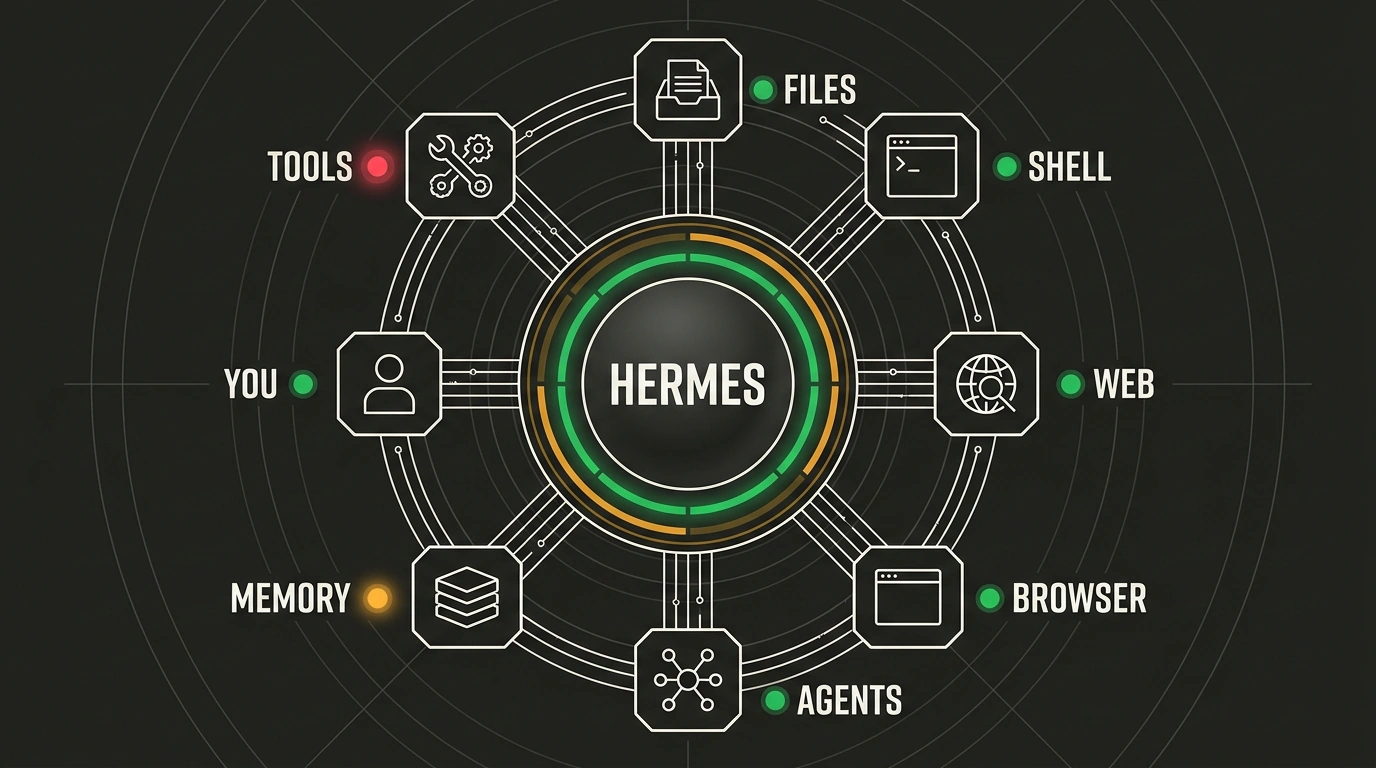
After restarting Hermes Desktop, the Panoptes panel docks to the right edge of the window. At the center sits the HERMES core with a "context eye," orbited by eight stations. The plugin listens to gateway events (tool.start, tool.complete, session.usage, subagent.*) and lights up the active station the moment a tool is called.
| Station | Hermes Tools Mapped Here | What Happens in Practice |
|---|---|---|
FILES | read_file, write_file, patch, search_files | Reading, searching, and editing files on disk |
SHELL | terminal, execute_code, process_manage | Running terminal commands and scripts |
WEB | web_search, web_extract | Web search and text extraction |
BROWSER | browser_exec | Browsing live websites |
AGENTS | delegate_task, cronjob*, subagent.* | Calling subagents and scheduled jobs |
MEMORY | memory, lcm_* | Accessing long-term memory |
YOU | clarify, todo_list | Asking you for details and updating the plan |
TOOLS | Other calls, including MCP | Third-party integrations and custom utilities |
The central "context eye" shows how full the agent's working memory is. When calm, it stays teal, its pupil turns toward the active station, and it blinks when a reply finishes. Past 70%, the eye turns amber; past 90%, it turns red—right when the model starts losing early details and getting confused.
On a real task, this saves you stress immediately. Take building a weekly report for a running-gear store. The agent lights up MEMORY (pulling last week's notes), moves to FILES (reading the product spreadsheet as the context eye climbs noticeably), runs a script in SHELL, checks news via WEB, and opens pages in BROWSER. Drop a broken link into the mix, and the BROWSER station immediately flashes a red failure dot. A silent error doesn't get buried in a long chat, and the agent adds the broken page to its fix list before sending the report to the client.
At the bottom of the panel hides a collapsible call feed showing each step's duration and total tokens. In that same run, it pinpointed the bottleneck: local steps finished in under two seconds, while delegating text work to a helper agent on AGENTS took about a minute. If you collapse the panel, a compact chip stays in the status bar. Panoptes only observes and never slows things down, and Settings → Plugins → Panoptes includes a Reduced Motion toggle to cut extra animation. Incidentally, the plugin author ran into an environment gap himself: his first build passed logic tests but crashed in real Hermes Desktop due to a React 19 dev JSX runtime quirk, so the repo now includes a dedicated render-harness.mjs tested against the desktop app's actual node_modules.
If the context eye turns amber at 70% (say, while rewriting descriptions for 40 products), don't wait for the red zone—split the job into batches of 10 in a fresh session. And if a red dot lights up on any station, expand the bottom feed and inspect the failed step before passing the result along.