Fifteen seconds of wild first-person action: a hallway, a foot kicks open a door, a bass drop, a dance floor, a night scooter ride down a neon street. And the whole time, an ordinary three-liter jar of "Shirokiy Karamysh" juice keeps appearing in the frame. No film crew, no studio, no video editor, and no CGI artist. One clip like this costs roughly 300 rubles, and a custom rock jingle for it adds another 30 rubles.
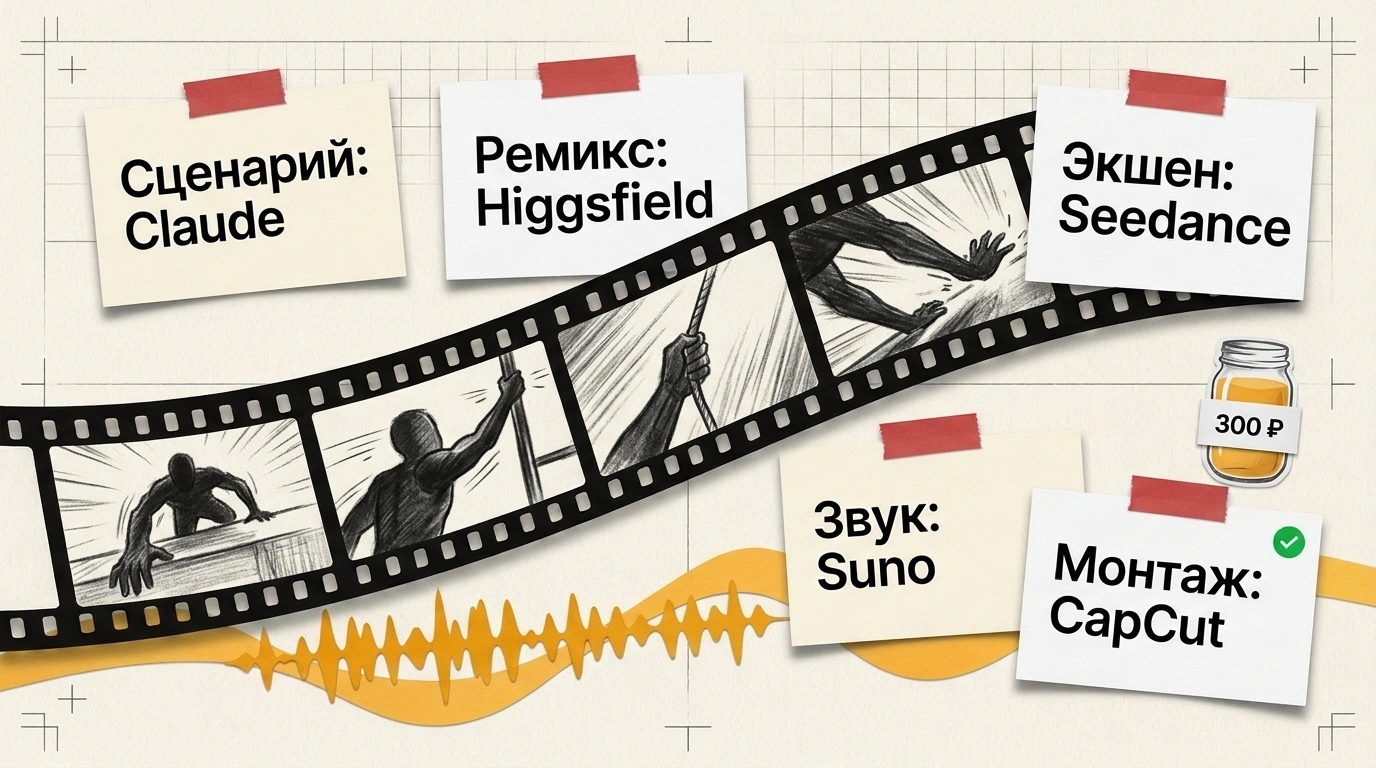
It sounds like a fairy tale from a banner ad, yet this result depends on one strict rule. You stop asking a single AI tool to do everything from one short prompt and split production into a pipeline of five or six focused tools. One writes the second-by-second plan, another rebuilds existing footage or generates scenes from scratch, a third fixes a warped object in frame, a fourth writes the music, and a fifth stitches it all together.
Why One Prompt Burns Budget and How to Split Roles
A typical first attempt with AI video looks the same every time. You open a generator, type "make a dynamic, juicy, beautiful ad for our product," and hit generate. You get back blurry mush with six-fingered hands, a melting logo, and random camera cuts. You tweak the prompt on the fly, hit "regenerate" five more times, and twenty minutes later your balance is zero with no usable ad.
Today's AI video market looks a lot like battle rap ten years ago. Back then, a 100-ruble microphone and an old home PC were enough to start: the barrier to entry collapsed, and a wave of grassroots creators flooded in. The same thing is happening to ad video right now. A browser and a chain of AI tools give a small business or solo marketer visuals that used to require a production studio. Still, a low barrier to entry doesn't replace directing.
The golden rule of saving money here is simple: idea first, credits second. If you try to invent the plot inside the generator, you just burn cash on empty takes. Before opening any paid service, run your product through a clear creative mechanic. In the work of Egor Osipov, Director of Marketing Communications at Vitamin.Tools, four techniques consistently deliver: metaphor (turning the customer's pain into a vivid physical image understood in one second), a cultural reference to a familiar movie or music video scene, name-dropping a recognizable character in the opening seconds, and the association method, where you match a work problem to a pop-culture parallel.
Look at how the association method worked in an ad for Vitamin.Tools, a service that unifies dozens of ad cabinets and returns up to 18% cashback. How do you show the pain of a marketer drowning in ten scattered accounts? They took the famous scene from Bruce Almighty, where the hero first suffocates among cabinets of paper files and sticky notes, then moves everything onto a computer in one swipe. They put the real service interface on the monitor and kept a fan Easter egg: "Welcome to internet revelations." The product's value lands instantly without a boring list of pricing tiers.
This approach also filters out "AI slop" — the flood of mindless AI clips like dancing virtual models, generic athletes with a ball, or fake luxury. Trend-library templates like those mostly collect junk views and instant annoyance. When a clear idea sits behind the camera, even major brands embrace AI creatives. Zolotoe Yabloko regularly releases clips with its green box referencing The Fifth Element or Halloween's Scream, and Pyaterochka tests AI video in mass content.
There is a second rule for viewer perception: don't try to pass AI generation off as live-action filming. Attempts to look "just like real life" on older models like early Kling versions have already leaked onto national TV, and they look blurry and fake. Viewers spot the trick immediately and pull back. By contrast, honest stylization — 2D pixel art, grotesque humor, or obvious movie parody — lands easily because the viewer understands the rules of the game and watches to the end.
To keep the whole chain clear in your head, keep this pipeline map handy.
| Production stage | Tool | Role in pipeline | Estimated cost |
|---|---|---|---|
| Idea and storyboard | Claude (Free) | Second-by-second script, model-tailored prompt, negative list | 0 ₽ |
| Scene remixing | Higgsfield (Genjutsu) | Swapping face, clothes, and product in hand from video reference | $19–$129 or €110/mo |
| Clip from scratch | Seedance 2.5 / Wan 3.0 | Dynamic action with the product in frame | 84–600 ₽ per clip |
| Spot frame repair | AI image editor + Genjutsu | Replacing a single object in hand via screenshot | Included in generation |
| Music and voiceover | Suno 6 + audio aggregator | Brand jingle and clean Russian speech over lip-sync | ~30 ₽ per track |
| Final assembly | CapCut | Syncing video and audio, cutting to the beat | Free / Pro |
| Expert content | HeyGen (Avatar 6) | Digital twin speaker for paid traffic | From $29 or €29/mo |
When roles are split like this, you know exactly where to fix a failure. If the pacing drags, fix the script. If the jar warps in someone's hand, repair one frame instead of regenerating the whole video from scratch.
Second-by-Second Storyboarding in Free Claude
Modern video models like Seedance 2.5 handle long, detailed prompts describing lighting, camera movement, and transitions very well. The catch is that writing that wall of text by hand takes two days, and catching contradictions inside it takes two more. So a text AI handles the first draft.
The nice part is that a free Claude account is plenty for this task. No paid plans, complex agents, or private projects required — everything happens in a normal chat window. Still, to get a working script instead of pretty fluff, you need to feed Claude four mandatory inputs.
First, name the exact target model right away, such as Seedance 2.5. Claude will tailor the prompt structure and syntax to that generator's quirks. Second, set the runtime (usually 15–20 seconds) and attach a visual style reference. For example, for the Dzen i Puls podcast intro, they dropped a frame from the South Korean series The Good Job featuring 2D pixel animation into the chat. The model immediately locked onto that aesthetic and stopped inventing random styles.
Third, ask Claude to structure its reply into strict blocks: technical parameters (aspect ratio and quality), the overall concept with explicit reference tags (Image 1 for the hero's photo and Video 1 for the motion source), and the storyboard itself. A storyboard is a second-by-second plan: what happens from 0 to 3 seconds, from 3 to 6 seconds, where the camera moves, and what sound plays on the cut. Without it, a video model stitches random shots into an incoherent clip.
Director's desk with a second-by-second ad storyboard in 2-4 second blocks, timecodes, and reference cards.
Fourth, always put negative constraints (a negative prompt) at the very end. This is a list of hard bans: no on-screen text, no logos, no watermarks, and no unrequested improvisation from the model.
Why does banning text matter so much? On that same Dzen i Puls intro test, Claude still slipped a Cyrillic title card into the first draft. Seedance dutifully tried to render it and turned the title into gibberish. Cyrillic inside video models still breaks easily. They fixed it with two short chat commands: "remove all text from the prompt" and "don't alter the character's clothes from the photo." The second take came out clean, and adding titles later during editing is far faster and sharper.
Pre-generation launch checklist
- Clear video concept defined (metaphor, cultural reference, or customer pain association)
- Honest stylization chosen without trying to fake a live-action camera
- Target video model (e.g., Seedance 2.5) and exact runtime specified in the Claude prompt
- Style, hero, and product references attached and numbered (
Image 1,Video 1) - Storyboard broken into 2–4 second segments with camera motion and audio cues
- Negative prompt added at the end banning any text, Cyrillic letters, and watermarks
Once this skeleton is ready, you move to video generation. Here the road splits into two paths: remixing an existing scene or generating everything from scratch.
Remixing Scenes and Swapping Products in Higgsfield Genjutsu
If you need to drop your character and real product into a dynamic scene with ready-made camera choreography, turn to Higgsfield AI and its Genjutsu mode. It uses video-to-video recasting: the AI lifts motion, lighting, and rhythm from a source clip and rebuilds a new character on top. Unlike old deepfakes that could only paste someone else's face, Genjutsu swaps the entire person: face, outfit, and the object in their hands.
Official showcase of the Higgsfield AI video generation platform (Source: higgsfield.ai)
In practice, this opens huge room for native product placement. In the classic The Shining scene with Jack Nicholson, they replaced the heroine with another character and swapped the knife for a pack of "Bombaster" croutons. In the slow-motion Quicksilver scene from X-Men, they uploaded the source clip alongside branded cups and a cap to get a punchy beverage ad. In the Bruce Almighty scene, the Vitamin.Tools dashboard appeared right on the hero's monitor.
The best news for beginners is that simple scenes don't even need a prompt. When filming a short clip of a character simply eating tiramisu, they uploaded the video reference and a face photo, left the text box empty, and the AI handled it on its own.
There is also a surprising finding about reference photos. You might assume that shooting a full "character sheet" (front, profile, full-body) helps the generator lock on better. In reality, an A/B test showed the opposite: a full character sheet in Genjutsu offered zero advantage, and a single clear face photo sometimes worked even better. Don't waste half a day on a studio photoshoot for a reference; start with one sharp portrait in even lighting.
Now let's talk money and credit burn, because Higgsfield eats budgets fast. One segment maxes out at 30 seconds. Official plans start with a free tier without commercial rights, followed by Starter ($19/mo for 200–270 credits), Plus ($59/mo for 1,000–1,200 credits), and Ultra/Max (~$129 or €110/mo for ~3,000 credits). During active testing on Ultra, 1,700 credits can vanish in the first week because the real cost of a clip always includes multiple takes. Paying directly from Russia requires a foreign card (for example, from Kazakhstan), while a workaround via OTP Bank requires a US VPN.
One simple trick keeps you from burning a month's quota in three evenings: don't render drafts at maximum resolution. Drop generation quality to 720p (90 tokens per 30 seconds) or switch straight to Genjutsu Lite, which charges 60 tokens for half a minute and just 18 credits for an 8-second clip. If the motion and facial expressions come out great, you can always sharpen resolution afterward with an upscaler like Flux.
Recasting still has two nasty traps that catch first-time users. The first is body-type and gender conflict. If a large bald actor runs in the source video, Genjutsu may make your slim, long-haired character equally bulky and bald, ignoring half your photo. The same goes for gender: putting a male face onto a female video reference makes the character adopt female posture and walk. Pick a source clip whose build matches your character.
The second problem is fast action and props. A calm scene like eating dessert works on the first try. Sprinting, sharp head turns, or the Wednesday dance require a whole string of takes because the face blurs in motion. Pure movie bloopers happen too: in a Mad Hatter scene from Alice in Wonderland, after upscaling, the hero confidently mimed tipping his hat, except the hat itself had vanished from his head.
If you don't have a fitting video reference or want total freedom without copying someone else's footage, the pipeline switches to generating from scratch.
Generating from Scratch in Seedance 2.5, Frame Repair, and Aggregator Savings
Dozens of video models exist today, but for real ad tasks with a product in hand, two tools hold up reliably: Higgsfield Genjutsu and ByteDance Seedance 2.5. Other models, including older Kling branches, often turn packaging into unreadable mush during fast motion. Seedance 2.5 generates clips up to 30 seconds and up to 4K, supports multimodal references (R2V), and produces audio together with the video. Through the official API, one second of video costs roughly $0.12 to $1.50+ depending on mode and resolution, though marketers in Russia usually find aggregators much easier.
A clear example built from scratch is that clip for the three-liter jar of "Shirokiy Karamysh" juice. The brief was bold: 15 seconds of frantic first-person action in the spirit of The Prodigy's "Smack My Bitch Up" video and the movie Hardcore Henry, with the jar staying in frame throughout. Claude wrote the second-by-second script with door-kicking, a dance floor, and a neon scooter ride, and Seedance 2.5 rendered the video.
It wasn't flawless on the first click, of course: in a test run, the juice sloshed realistically inside the jar mid-frame. Still, the jar kept its recognizable shape, and in other tests with "Bombaster" croutons and Danone's "Skeletony" yogurt, the model held the logo and brand name steady. Only during a sharp side turn did an extra green element stick to it and small text blur slightly. For a fast-paced social clip cutting every two seconds, that accuracy is completely usable.
What if the whole scene looks great, except the AI put the wrong item in the hero's hand? Regenerating the entire video is expensive and pointless because a new take will break the great facial acting. That's where inpainting (spot object replacement on a single frame) saves you.
In one test, the hero ended up holding a shawarma instead of a World Cup trophy. The fix took four steps. First, they took a screenshot of a clean frame (Image 1). Next, they grabbed a photo of the trophy on a white background from an Ozon product card (Image 2). In an AI image editor, they gave a direct prompt: "Replace the object in Image 1's hands with the object from Image 2." They fed the fixed frame back into Genjutsu Lite alongside the hero's photo and product image, and the model rebuilt the clip with a properly sized trophy in hand.
Another big topic is how not to overpay 4x to 10x per generation. To avoid dealing with foreign bank cards, users in Russia often go through AI aggregators — unified dashboards accepting ruble payments with multiple models under one roof. Two popular options work completely differently. Syntx AI shines with a huge library of ready-made trends and templates with pre-written prompts, but relies on a monthly subscription: if you don't renew, your existing tokens freeze. Each token costs 2.5–3 rubles, so a heavy 300-token video run hits your wallet fast. Sovetnik AI, by contrast, was built by Russian marketers for ruble cards with no subscription and no expiring balance: credits are nearly 1:1 with rubles (a 3,000-credit pack costs 2,700 rubles, or you can top up as little as 420 rubles for a single task).
That difference enables clever "arbitrage." You browse the Syntx trend library, find a fresh combo of video reference and proven prompt, take it over to Sovetnik AI, and run the generation not on the priciest template, but on the Chinese model Wan 3.0. That's how they rebuilt a clip swapping Michael Scott from The Office for a colleague at pocket-change cost. Look at the price spread across setups for a single 14-second clip.
Cost of One 14-Second Clip Across Setups
The gap between the cheapest and most expensive option reaches tenfold. When testing ad hypotheses — rolling out five to seven creatives to see which one earns clicks — burning the max tier on every draft makes zero sense. Run tests on budget modes, and only re-render in high quality once a concept proves its click-through rate.
Brand Audio in Suno, Clean Voiceover, and CapCut Assembly
Once the visuals are ready, it's tempting to slap on the first random track from a free music library. Then creators wonder why viewers scroll past. Sound drives half the retention in short-form video, and custom AI music is heavily underrated today.
In Suno 6 through an aggregator like Syntx, a full one-minute track about your brand or product costs 10 tokens — around 30 rubles. You write lyrics with your company name, pick a genre like Hard Rock or Punk Rock, add sound presets, and explicitly exclude cheesy pop. In a couple of minutes, you get an original jingle that won't trigger copyright strikes on social platforms and sticks in viewers' heads on the first listen.
On Suno's free tier ($0, ~50 credits/day), commercial use of tracks is strictly forbidden. You only own ad and monetization rights for songs generated during an active paid Pro ($10/mo, 2,500 credits) or Premier ($30/mo, 10,000 credits) subscription. If you create a hit on a free account and upgrade to Pro later, that track does not become commercial retroactively. When working through ruble aggregators, always check their business licensing terms.
A second common headache is Russian speech inside video models. Generators can output audio alongside video, but in Russian they regularly botch word stress and swallow syllables. In a test clip with hyenas, the model mangled a phrase about a roe deer so badly that the meaning vanished.
Follow one iron rule here: never regenerate a video because of bad Russian voiceover. Video models don't charge extra for audio, and that rough speech still does useful work: the character's lips move roughly in sync with the words (lip-sync). Afterward, you simply open your aggregator's audio section and replace the audio track with a clean voice.
You have three options. First, standard Text-to-Speech (for instance, MiniMax at ~0.3 credits per short phrase with speed and emotion controls, though the tone can sound slightly robotic). Second, Voice Change: you record the line yourself into a regular mic with natural pauses, and AI swaps your voice to any timbre from its library. Third, your own AI avatar's voice if you've already trained a digital twin; its diction sits cleanly as a voiceover on any ad cut.
Final assembly happens in plain CapCut. Drop in your finished video clips, custom Suno track, and clean voiceover. Automated AI editing often gets in the way for short ad cuts — doing it by hand is faster and tighter. When the shawarma-to-trophy test accidentally pulled an earlier reference with shifted audio, the new render came out out of sync too. Instead of regenerating, they nudged the audio track by a fraction of a second in CapCut in ten seconds, and the ad was ready to export.
HeyGen AI Avatars for Paid Cold Traffic
Dynamic promo clips are one thing, but a huge share of marketing sales comes from expert content: webinar invites, case breakdowns, and handling customer objections. Setting up lights, booking a studio, and memorizing scripts every time is slow and expensive. A digital twin in HeyGen (the current Avatar 6 model supports over 175 languages) handles this part of the pipeline.
HeyGen AI Studio editor interface with text script on the left and AI avatar on the right (Source: heygen.com)
Building your own avatar takes no magic, though it depends heavily on source quality. Egor Osipov built his twin from two real recordings: he pulled his voice from a 20-minute lecture for Jivo and took the video from a podcast recording. One catch: the AI copies your exact state. If you looked tired on the source podcast, your avatar will deliver every line looking tired too. For serious commercial traffic, it pays to shoot one clean studio source video in high spirits. HeyGen also guards against identity theft: creating an avatar requires passing a short live webcam verification.
Cost-wise, it's the most predictable tool in the whole stack. The free tier gives roughly three watermarked clips up to one minute long. The working Creator plan costs $29/mo (or $24/mo billed annually) with 600 credits, 1080p quality, and voice cloning; Pro at $49/mo offers 1,000 credits and 4K; Business at $149/mo targets teams. In real-world use on a ~€29/mo plan with 1,200 credits, a 24-second clip uses 20 credits (roughly one to two credits per second). Even a full month of active work burns around a hundred credits, leaving plenty of headroom. The only minor annoyance is a cap on saved avatar slots, forcing you to delete old drafts before uploading new ones.
There is one marketing trap that burns newcomers on their very first launch. A plain "talking head" on screen only works for warm audiences — subscribers who already know you and want to listen. In cold paid traffic, viewers swipe past a static speaker in two seconds.
To make an avatar pay off on cold audiences (for conference invites or expert ads about ad setup), pack its speech with visual movement. Change the frame every three to four seconds: cutaways from Higgsfield, short visual inserts from Seedance, callouts, and trendy effects. The avatar carries the expert message and tone, while AI video inserts hold attention and drive the click.
Legal Boundaries of Movie Remixes and Safe Alternatives
Finally, a cold shower regarding the flashiest part of this pipeline. Remixing scenes from The Shining, X-Men, or Bruce Almighty looks amazing and pulls lots of reactions. As a learning exercise, portfolio piece, or internal team joke, it's great practice. The moment you put that clip into commercial paid targeting, however, the Russian Civil Code (GK RF) steps in.
Under Articles 1259 and 1263 of the Russian Civil Code, the film itself, its individual frames, characters, and recognizable scenes are protected by copyright. Running a clip through Higgsfield Genjutsu, swapping the actor's face, and placing your product in their hand does not make it an "original" work. Article 1270 explicitly classifies adaptation and derivative works as exclusive rights of the copyright holder.
Relying on free quotation under Article 1274 in ads won't save you either: that rule covers news, reviews, criticism, and education, not commercial product promotion. Even the parody exception (Article 1274, Clause 4) almost always turns into a minefield in ad creatives, forcing you to prove in court where parody ends and exploiting someone else's reputation begins. Meanwhile, statutory damages under Article 1301 are steep: 10,000 to 5,000,000 rubles per infringement. On top of that, ad platforms themselves increasingly reject clips with recognizable movie footage during moderation.
Does that mean you have to ditch the whole pipeline? Not at all — just change your reference source. The cleanest path for paid traffic is using broad genre tropes instead of someone else's frames. In the "Shirokiy Karamysh" juice clip, they borrowed the idea of first-person action and energy without copying a single specific shot from another movie: the vibe lands immediately, with zero copyright claims. A second working option is shooting simple smartphone clips yourself. Genjutsu doesn't need a Hollywood blockbuster: film a colleague in the office or on the street, hit the right gesture, head turn, and camera rhythm, and let the AI restyle the location, clothes, and look into cyberpunk or 2D pixel art. Finally, standard stock video with a commercial license works great as a base for motion transfer and product swapping, clearing both platform moderation and legal review smoothly.