You copy an example from the Kubernetes Gateway API docs, wire TLS with certificateRefs pointing to a Secret, deploy to AWS EKS—and HTTPS stays silent. The AWS Load Balancer Controller (LBC) ignores certificateRefs and won't upload secrets to ACM. Instead, it looks up a certificate in ACM by hostname or reads an ARN from LoadBalancerConfiguration. Since ingress-nginx maintenance is winding down, it pays to learn these quirks early.
How Gateway API Differs from Ingress NGINX
Classic Ingress accumulates string annotations like nginx.ingress.kubernetes.io/*. The API never validates them: a typo silently passes through, and load balancer settings live in the same file as app routes. On EKS, you also have to run NGINX proxy pods.
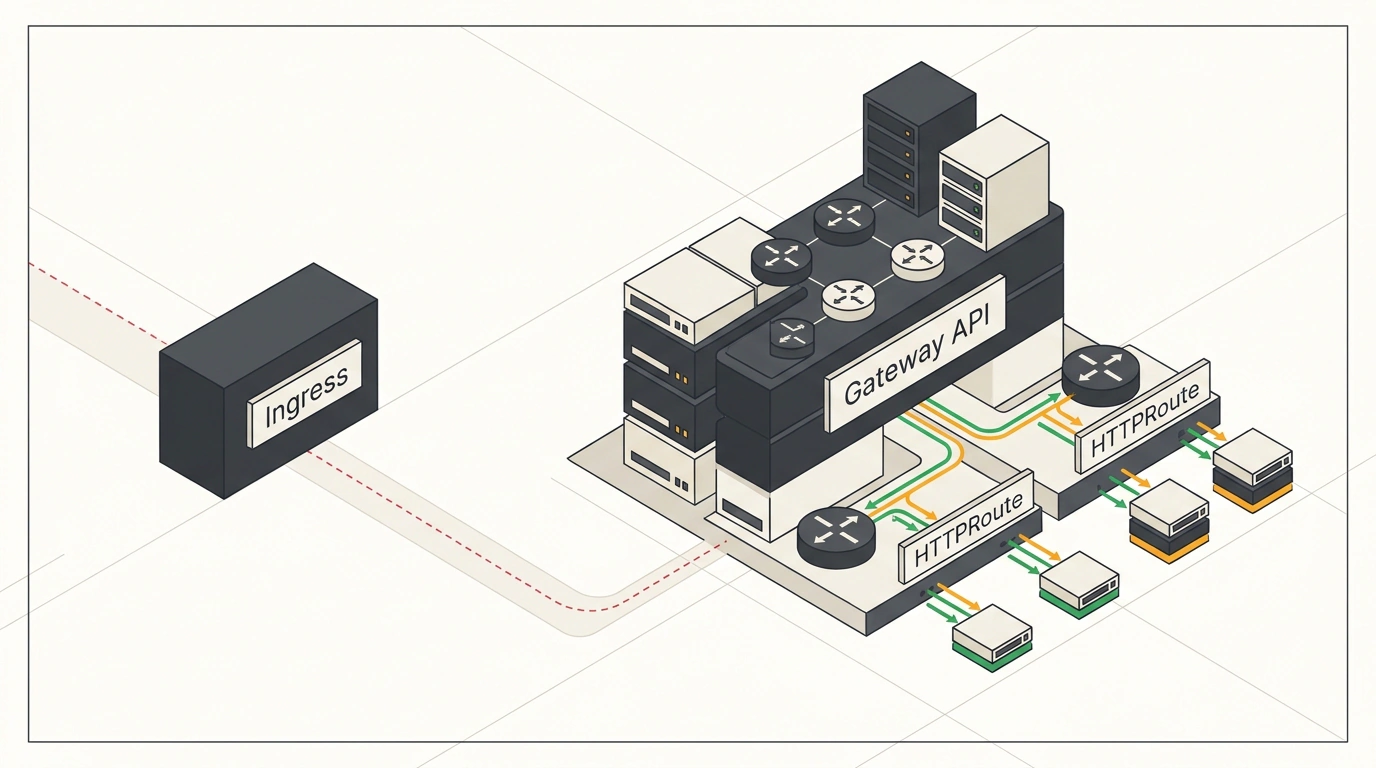
Gateway API (v1.6.0, gateway.networking.k8s.io/v1) splits those roles. Infrastructure owns GatewayClass and Gateway (load balancer, internet-facing/internal, ports, TLS). App teams write HTTPRoute or GRPCRoute in their own namespaces and attach via parentRefs (cross-namespace links use ReferenceGrant).
Because the gateway is decoupled from Deployment and Service, a new Gateway can spin up alongside ingress-nginx without interrupting live services. On EKS, L7 traffic goes through LBC straight to an AWS ALB with no NGINX pods. If you need Lua or service mesh features, reach for Envoy Gateway, NGINX Gateway Fabric, Cilium, Istio, or VPC Lattice.
AWS EKS Components and Working YAML
In AWS LBC, Gateway API v1.6.0 is stable: L4 (TCPRoute, UDPRoute, TLSRoute on NLB) has worked since v2.13.3, and L7 (HTTPRoute, GRPCRoute on ALB) since v2.14.0. You can't mix L4 and L7 on one Gateway; NLB and ALB require separate gateways.
AWS-specific settings live in gateway.k8s.aws/v1beta1 CRDs: LoadBalancerConfiguration, TargetGroupConfiguration (health checks, ip/instance), and ListenerRuleConfiguration. Your cluster needs LBC IAM permissions, subnet discovery tags, the kubernetes.io/cluster/<cluster-name>: owned tag, and VPC CNI for ip mode. Install Gateway API v1.6.0 CRDs and LBC CRDs, then apply the manifests:
# AWS ALB controller (for NLB: gateway.k8s.aws/nlb)
apiVersion: gateway.networking.k8s.io/v1
kind: GatewayClass
metadata:
  name: aws-alb
spec:
  controllerName: gateway.k8s.aws/alb
---
# ALB parameters in a typed CRD
apiVersion: gateway.k8s.aws/v1beta1
kind: LoadBalancerConfiguration
metadata:
  name: app-alb-config
  namespace: default
spec:
  scheme: internet-facing
  ipAddressType: ipv4
---
# Gateway provisions an AWS ALB with HTTPS on port 443
apiVersion: gateway.networking.k8s.io/v1
kind: Gateway
metadata:
  name: app-gateway
  namespace: default
spec:
  gatewayClassName: aws-alb
  infrastructure:
    parametersRef:
      group: gateway.k8s.aws
      kind: LoadBalancerConfiguration
      name: app-alb-config
  listeners:
  - name: https
    protocol: HTTPS
    port: 443
    hostname: app.example.com
---
# Application route attached via parentRefs
apiVersion: gateway.networking.k8s.io/v1
kind: HTTPRoute
metadata:
  name: app-route
  namespace: default
spec:
  parentRefs:
  - name: app-gateway
  hostnames:
  - "app.example.com"
  rules:
  - matches:
    - path:
        type: PathPrefix
        value: /api
    backendRefs:
    - name: my-service
      port: 8080
Omitting certificateRefs in listeners is intentional: LBC automatically finds the certificate for app.example.com in AWS ACM, as long as you issue it beforehand.
Zero-Downtime Cutover: Six Reversible Steps
First, convert Ingress resources into Gateway and HTTPRoute manually or using ingress2gateway (--providers=ingress-nginx) and lbc-migrate. lbc-migrate includes a Migration Console whose dry-run checks AWS plans before creating an ALB. This also surfaces anything that doesn't translate 1:1, such as regex rewrite-target, configuration-snippet, and WAF Classic.
Next, apply the manifests—LBC spins up a second ALB next to ingress-nginx while DNS still points to the old stack. Wait for Programmed: True and verify routes:
# Gateway status, new ALB DNS, and route binding
kubectl get gateway app-gateway -o wide
kubectl describe httproute app-route

# Test the new ALB before switching DNS
curl -i -H "Host: app.example.com" http://<new-alb-dns>/api
For HTTPS, run curl --resolve app.example.com:443:<new-alb-ip> https://app.example.com/api to verify TLS and health checks. Then gradually shift traffic with Route 53 weighted records while watching 4xx/5xx rates and latency. If errors spike, shift weight back to the live ingress-nginx. Once the new ALB handles full traffic cleanly, remove the old Ingress objects and ingress-nginx.