Do you know that feeling when you set a bid in the Wildberries ad dashboard, go to sleep, and wake up to an empty budget and a product card that somehow slipped to page three? For years, the marketplace ad auction has been a source of constant stress. Competitor bids jump every minute, third-party bidder tools either push cost-per-click sky-high or lag behind platform algorithms, and manual monitoring turns a seller's life into a 24/7 watch at the screen.
The Wildberries team has rolled out a comprehensive update to the WB Promotion platform. The main focus is on automated bid management (autobidder) and real-time holding of target positions. I studied the new features closely, tested the algorithms on live product cards, and I'm ready to break down the entire mechanism for you.
Second-Price Auction: Why Clicks Will Finally Get Cheaper
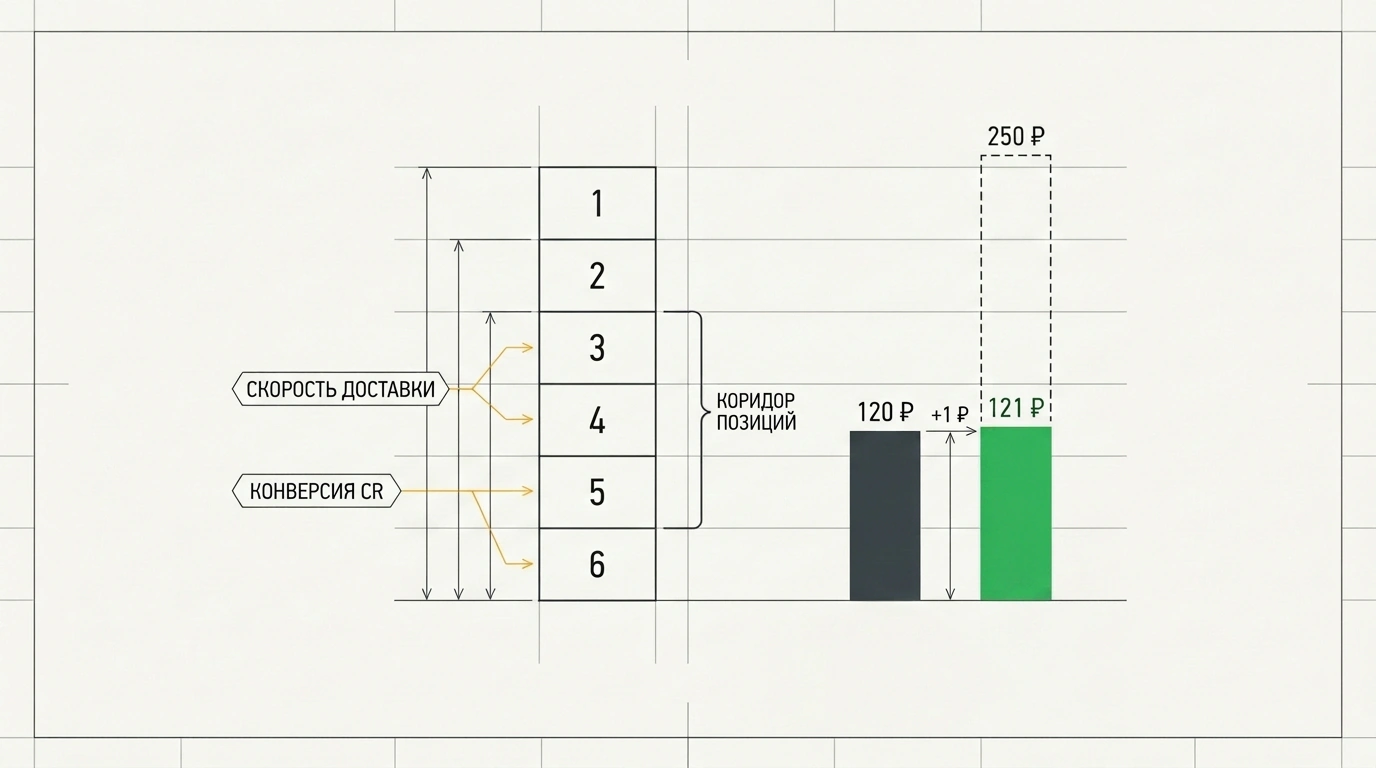
The biggest pain of the old first-price auction was that you paid exactly what you entered as your bid. If you set 250 rubles per 1,000 impressions or per click, and the nearest competitor below you offered 120 rubles, the platform charged you the full 250 rubles. The 130-ruble difference simply went straight to the marketplace.
Now WB Promotion is moving to a second-price auction (Vickrey auction) model. The mechanics are completely transparent:
- You set the maximum bid that your unit economics can handle without going into the red.
- If your bid wins the competition, the system doesn't charge your maximum. Instead, it charges the nearest rival's bid plus the minimum auction step (usually just one ruble).
- If a competitor offered 120 rubles and your limit was set to 250 rubles, the actual charge will be 121 rubles.
This is a huge step toward a healthier market. The algorithm protects your ad budget and removes the need to spy on niche competitors every minute.
Holding Target Positions: A Range Instead of Roulette
The second major update is the ability to set a target position range. Previously, sellers fought strictly for first place, overpaying three times the price for the dubious pleasure of sitting at the very top. In practice, second, third, or fourth place in search results often brings a comparable volume of clicks at a much lower advertising cost share (DRR).
In the updated dashboard, you specify your desired impression corridor, such as positions 3 through 6 in search. The built-in autobidder tracks other auction participants and automatically raises or lowers your bid to keep your SKU strictly within the chosen window.
At the same time, the system weighs ranking factors that work alongside your money:
- Delivery speed to the buyer: if your inventory sits in a regional warehouse closer to the customer, the algorithm gives you priority even at a lower bid.
- Conversion rate (CR): a card with a high add-to-cart and order rate needs a smaller bid to hold the top spots than a low-converting item.
Earlier, we looked at how a search query report helps assess a card's real visibility, and how proper ad spend control cuts off irrelevant junk traffic.
Separating Search and Catalog
Another practical lever is separate bid management for search and catalog placements. Shopper behavior in these two zones is fundamentally different. People come to search with a hot, specific intent: they want a particular product with clear specs, so order conversion is traditionally higher there. In the catalog, people mostly browse the assortment in their free time, so cost-per-click there should be significantly lower.
Splitting bids lets you set a comfortable higher bid for hot search traffic without wasting money on cold impressions deep inside catalog categories.
Don't set aggressive maximum bids across your entire product line right away. Run the auto-strategy for 2–3 days with a strict daily budget cap (for example, 1,500–2,000 rubles) and a target position range of 4–8. Let the algorithm collect initial auction stats for your key clusters, then gradually narrow the range to the top 3.
The new automation tools from Wildberries remove the need for unreliable external workarounds. The main thing is to always watch your unit economics, check your DRR regularly, and let the algorithms handle the routine work for you.