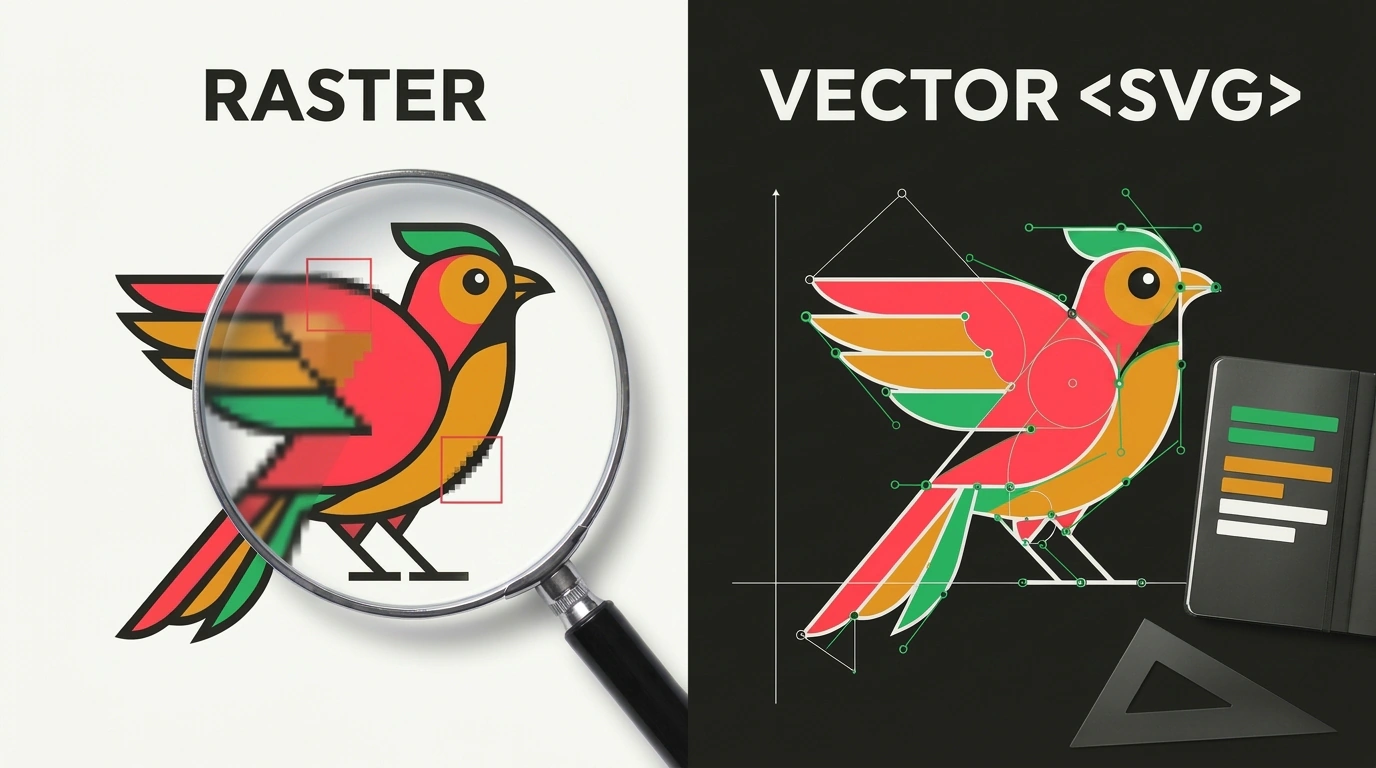
Something strange is happening in AI graphics during the second half of 2026. Over the past eighteen months, dedicated image models learned to generate near-photorealistic frames and tweak details through chat, yet in everyday work they're increasingly beaten by plain text models—the ones that don't output pixels at all.
Instead of generating a picture, a text model writes code and produces a poster, diagram, interface, or 3D asset you can actually edit by hand afterward. Flagships like Gemini 4 Neon, Claude Opus 5.5, and GPT-6 Astra have leveled up their visual thinking. They now build clean, good-looking graphics where any detail can be adjusted without playing the lottery—where asking a generator to "nudge the headline left" for the third time suddenly scrambles everything else on the canvas.
A kakapo poster and designing blind
A simple test with Gemini 4 Neon in Google AI Studio shows how this works in practice. The prompt sounds almost like a design brief: create a 1970s-style graphic design SVG poster supporting New Zealand's kakapo parrot recovery program, and fact-check the details before drawing.
If you rarely work with vector graphics, an SVG is just a plain text file describing shapes, curves, colors, and real fonts instead of a grid of dots. You can blow it up to billboard size without blur, and you can fix any label in a basic text editor.
In this test, Google AI Studio queried Google Search on its own, pulled current numbers for the kakapo recovery program (all verified accurate), and added a clever touch. On the branch next to the parrot, it drew red berries from the rimu tree. That wasn't random decoration: rimu mast years directly trigger the birds' breeding season. Search context fed straight into artistic accuracy.
Then came a funny limitation of the environment itself. Google AI Studio doesn't render SVGs inline inside chat, so the model was literally laying out the poster blind without seeing its own overlaps. It took three short rounds of fixes:
- Ask it to make the kakapo look more realistic, especially its face, using image search references.
- Attach a screenshot and point out the bug: the text overflows its badge.
- Share two more screenshots showing neighboring shifted blocks.
That was it. The result was a crisp retro poster, with its biggest advantage hidden inside the file. If you spot a typo in a caption, you fix it right in the SVG code. If you want to move a branch or change the background, you open the same file in Inkscape, Adobe Illustrator, or the browser-based Boxy SVG and drag each layer by hand. No magic, just pure control.
Beyond SVG: HTML, Blender scripts, and the vibe-gamedev boom
Put a text model inside a coding agent that runs scripts and inspects the output, and the ceiling jumps much higher. SVG turns out to be only the simplest option.
An agent can build layouts in HTML and CSS, draw on a 2D HTML Canvas, generate finished PDFs, or write Blender scripts that output full 3D models and scenes. WebGPU shaders fit right in too—small GPU programs that run directly in the browser to render complex 2D and 3D graphics in real time. Basically, any visual you can describe as a file on disk or a script's output is now within reach of a standard text LLM.
That's a big reason behind the recent wave of "vibe gamedev." Models like Claude Opus 5.5, GPT-6 Astra, and Gemini 4 Neon already produce solid game assets (3D models, textures, sprites) purely through code. For an indie developer or a weekend side project, this changes the whole rhythm. Need a different armor color, higher contrast, or a winter-level sprite variant? You don't fight prompts to roll a similar image again. The model simply tweaks its own script, and the older version stays easy to reuse and remix.
Code vs. pixels: where raster models stumble and where they shine
Most familiar image generators output raster graphics (bitmaps)—a flat grid of pixels like PNG or JPEG. Stable Diffusion, DALL-E, and Midjourney kicked off that wave, and over roughly the past 15 months LLM-backed models like Google Nano Banana and OpenAI ChatGPT Images caught up fast. They really did get much more obedient: they can edit existing frames and keep details consistent across several chat turns without melting into mush on edit three.
Still, three built-in flaws of raster images haven't gone away. First, zoom in and tiny weird artifacts still show up. Second, letters are painted as pixel blobs rather than set with real typography, so crisp fonts and small text remain hit-or-miss. Third, the file stays flat. You can describe changes in words or draw arrows over the image, yet you can't click an individual layer and nudge it two millimeters over.
| Criterion | Code-Driven Generation (LLM) | Raster Models (Nano Banana, ChatGPT Images, Midjourney) |
|---|---|---|
| Output Structure | Vector, markup, or script with layers and parameters | Flat grid of pixels (PNG / JPEG) |
| Text Handling | Real fonts, exact editing in code | Pixel-drawn letters, risk of small distortions |
| Targeted Edits | By hand in Inkscape, Illustrator, Boxy SVG, or in code | Describing changes in chat or sketching over the frame |
| Scaling and Detail | Sharp lines and predictable geometry | Small visual artifacts appear on zoom |
| Where It Wins | Diagrams, posters, UI, decks, charts, game assets | Photorealistic images and live scenes |
Code-driven graphics solve all three raster headaches at once. Even so, it's too early to write off image models: whenever you need true photorealism, skin texture, complex lighting, or a lifelike scene, dedicated generators are still the right tool. For practical deliverables—explanatory diagrams, editable posters, UI components, data visualizations, slides, and game assets—code already wins on reliability.
Anthropic's "Bitter Lesson" and the bet on Claude Design
Against this shift in tools, the rivalry between major AI labs looks especially interesting. When Google Nano Banana and OpenAI ChatGPT Images arrived, it looked from the outside like Anthropic had a glaring hole in its product lineup. Google had Nano Banana for images plus Veo video models and the new Gemini Omni. OpenAI had ChatGPT Images (and earlier its Sora video model, which the company eventually shut down). Meanwhile, the corporate world still runs on PowerPoint, so selling enterprise seats without an in-house image generator looked risky.
In reality, things played out the opposite way. Claude builds strong slide decks and web layouts through code, and Anthropic Labs launched Claude Design—a full environment for design systems, interactive prototypes, pitch decks, and landing pages powered entirely by code generation.
Visual Claude Design environment for generating interfaces and design systems via code (Source: official Anthropic website)
The workflow is practical: Claude Design connects to your existing repository via Claude Code, pulls in your real React components and design tokens, and exposes key layout settings as live Tweaks sliders right on the canvas. Adjust spacing or accents by hand, preview them on real product components, and send the finished spec straight back to Claude Code for production.
The whole story looks like another chapter of the "Bitter Lesson"—researcher Richard Sutton's famous observation that general-purpose methods powered by scale and compute eventually overtake narrow, specialized tools. Everyone assumed business design required a dedicated image model, yet general-purpose text LLMs simply reached visual design through code.
