If you've ever tried to package a Node.js app into a portable archive, run automated tests without creating temp folders on disk, or feed generated code straight into the runtime, you know this old pain point. File I/O in Node.js has always been tied tightly to the physical disk. To simulate a directory tree in RAM or read from a compressed archive, developers had to use brittle workarounds: monkey-patching the global fs object with third-party libraries like memfs or mock-fs.
Monkey-patching core modules inevitably breaks as soon as a project uses native addons, worker threads, or the strict ECMAScript Module (ESM) loader. We already tracked how the server platform has matured when we looked at the evolution of Node.js releases.
Now those workarounds are finally going away. The Node.js 26 line (starting experimentally in 26.4.0 and stabilizing in 26.9.0–26.10.0) introduces a foundational subsystem: the built-in node:vfs (Virtual Filesystem) module.
Its development was led by Platformatic co-founder and Node.js TSC member Matteo Collina, alongside James Snell (loader module) and Philipp Dunkel (ZIP provider and CLI flags). Let's break down how this subsystem is designed under the hood.
Why Patching fs Hit a Dead End
Overriding fs.readFile or fs.stat failed for three main reasons:
- Multithreading: Each
worker_threadsworker runs in its own V8 isolate. Mutatingfsin one thread isn't visible in other threads without complex shared-memory synchronization. - The ESM loader: Node.js core accesses files through C++
libuvsystem calls. JavaScript-level patches tofswere bypassed by the loader, soimportstill hit the real disk and threwERR_MODULE_NOT_FOUND. - Native
.nodeaddons: Loading them via the OS (dlopenon Linux/macOS orLoadLibraryon Windows) requires a real file descriptor, which in-memory JS mocks couldn't provide.
node:vfs Architecture: Resolver and Provider
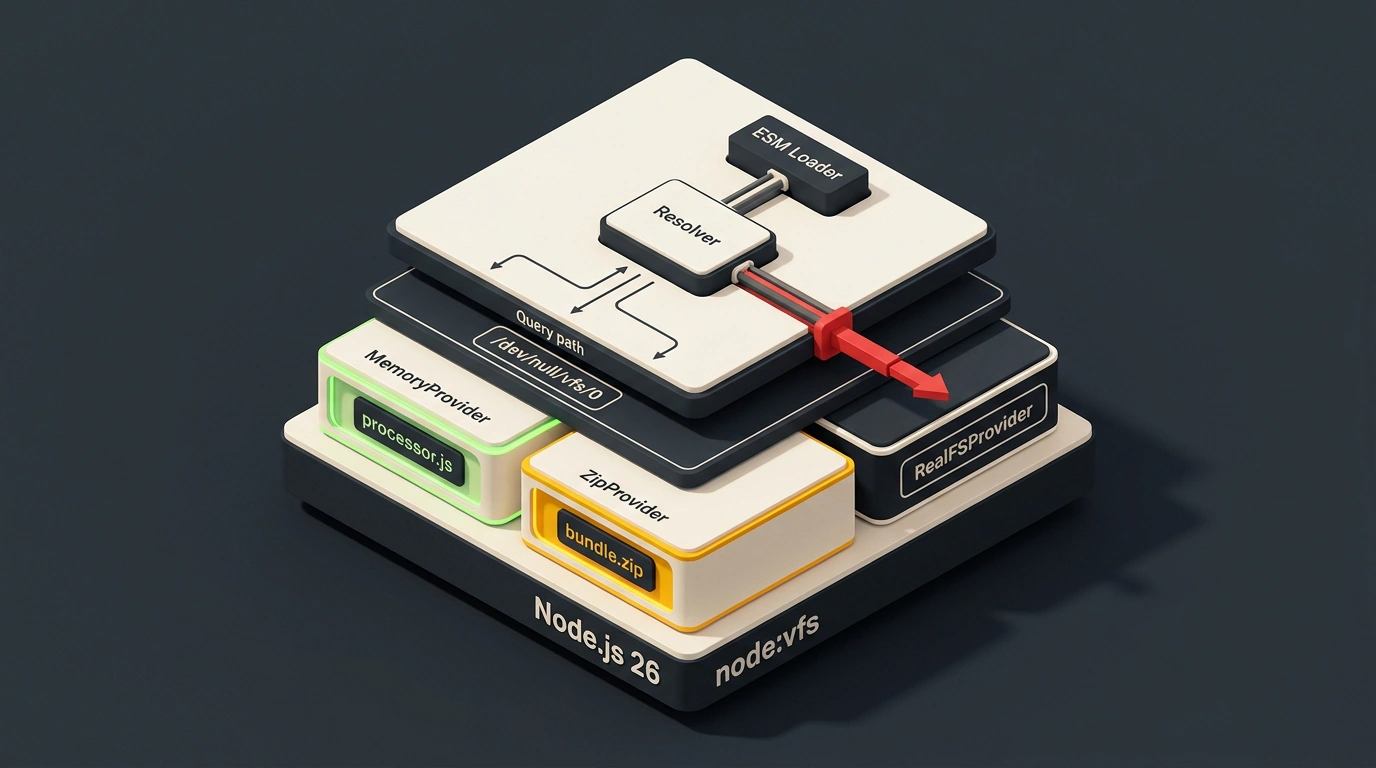
To remove these roadblocks, node:vfs splits the architecture into two isolated layers: the Resolver and the Storage Provider.
- The Resolver lives inside the platform core. It integrates with path resolution,
package.jsonlookup rules (exports,imports), and CJS/ESM loader hooks. It handles path logic, relative traversal, and module resolution rules. - The Storage Provider is a pure I/O abstraction. It knows nothing about Node.js module rules. Its job is limited to basic binary operations: read bytes by key, write data blocks, return metadata (size, timestamps), or list directory entries.
This separation lets you plug any backend into a single filesystem interface: RAM, a compressed ZIP archive, a local disk directory, or cloud storage.
Isolated Namespaces Instead of Global Mount Points
Traditional virtual filesystems mount at user-defined paths like /virtual. The creators of node:vfs deliberately rejected that model. Global paths caused collisions between independent libraries and risked silent fallbacks to the real disk whenever a file was missing from the virtual tree.
In node:vfs, the runtime generates an isolated namespace for each mounted filesystem. On POSIX systems, it creates a path like /dev/null/vfs/0; on Windows, it uses the null device. The virtual tree stays completely isolated from the physical disk, eliminating accidental conflicts.
Built-In Providers: Memory, Disk, and ZIP Archives
Node.js 26 ships with three built-in storage providers:
MemoryProvider(default): A dynamic in-memory file tree supporting directories, symlinks, andfs.watchevents. Ideal for tests and on-the-fly code generation.RealFSProvider: A bridge to a real folder on disk to expose specific files inside a virtual context.ZipProvider: Mounts compressed ZIP archives vianode:zlib(ZipFile,ZipBuffer) with transparent decompression on read.
Here is how you create an in-memory virtual filesystem and import a generated module:
// demo-vfs-memory.mjs — Creating an in-memory VFS and importing a module
import { createVFS, MemoryProvider } from 'node:vfs';
import fs from 'node:fs/promises';

// 1. Initialize VFS with the memory provider
const vfs = await createVFS({
  provider: new MemoryProvider(),
});

// 2. Mount an isolated tree
const mount = await vfs.mount();
console.log('Mount point:', mount.path);

// 3. Write module code directly to memory
const moduleCode = `
  export function computePayload(data) {
    return data.map(item => item * 2);
  }
`;

await fs.writeFile(`${mount.path}/processor.js`, moduleCode, 'utf8');

// 4. Import the module straight from memory without touching disk
const { computePayload } = await import(`${mount.path}/processor.js`);
console.log('Result:', computePayload([10, 20, 30]));
Running from Archives and Single Executable Applications (SEA)
The biggest practical win of node:vfs is distribution. You can bundle a microservice with all its node_modules dependencies and assets into a single ZIP file and run it without extracting anything first:
Isometric exploded diagram of a monolithic Single Executable Application ZIP archive in Node.js 26 using node:vfs and loading a C++ addon via memfd_create without disk extraction.
# Run a Node.js 26 app directly from a packed ZIP archive
node --experimental-vfs --vfs-load=application-bundle.zip
In addition, node:vfs is built into Single Executable Applications (SEA). Setting "useVfs": true in the build config packs application assets into the virtual filesystem, letting your code read them with a standard fs.readFileSync('./assets/config.json').
For native C++ addons (.node), the team used the memfd_create syscall in the Linux kernel. The runtime creates an anonymous in-memory file descriptor with executable permissions and passes it straight to dlopen.
Why It Matters for Coding Agents and Isolation
node:vfs is especially valuable for autonomous AI agents. When an agent experiments with generated code or spins up temporary test sandboxes, writing to physical disk adds latency and clutters the workspace. With a virtual filesystem, an agent can spin up an environment in milliseconds, run tests, and free memory instantly. This echoes the lessons from the AI agent Smith postmortem: reliable automation depends directly on having a controllable environment.
The node:vfs module is a storage abstraction, not a security sandbox. Code running inside a virtual filesystem still has access to network sockets and OS processes. When the Node.js Permission Model is enabled, mounting a VFS requires the explicit --allow-fs-vfs flag.
Synchronous reads of compressed files from ZipProvider block the Event Loop during decompression, so use streams for high-throughput workloads. Also, the SEA useVfs option does not yet support working alongside useSnapshot heap snapshots.
With node:vfs, the Node.js ecosystem finally gets a native standard for virtualizing I/O, leaving brittle monkey-patch libraries behind.