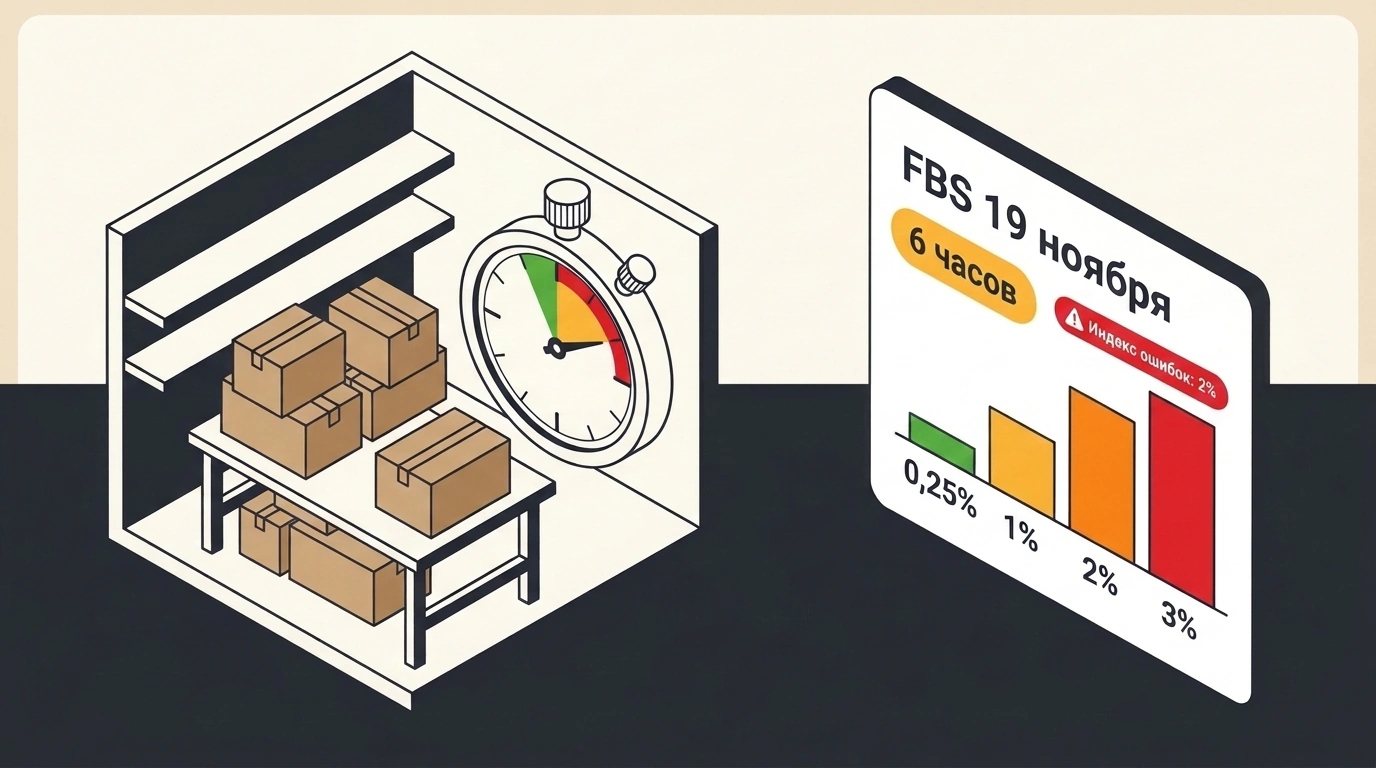
Picture a normal morning at your warehouse. Orders drop into your Ozon dashboard, you have a comfortable 10-hour packing buffer, you keep the recommended drop-off slot in mind, and a couple of cancellations from mispicks over two weeks don't bother you. Starting November 19, the math behind that exact workflow changes. The marketplace tightened four screws at once in its FBS model (where you store goods yourself, pack orders after they arrive, and take them to a drop-off point).
The Marketplace_biz channel summed up the rollout bluntly: four changes in one package, and every single one either takes extra money or squeezes warehouse requirements. Ozon is steadily making fulfillment from your own warehouse more expensive.
A Flexible Packing Schedule You Now Have to Pay For
The first two hits work together: removing the recommended slot and charging for a longer shipment window. Previously, Ozon suggested a specific handover interval. Hitting it earned a discount, while missing it brought a penalty. Now that slot is going away. The change rolls out in waves rather than to everyone at once, with a notice in your seller dashboard.
In return, you get to set your own packing and handover time. Sounds like freedom? Only until you read the rate card. If you pack and hand over within 6 hours, there is no extra charge and you pay the base rate. Stretch the window past 6 hours, and Ozon adds a progressive fee of 0.25% to 3% of the total value of all items in the order. For example, a 6.5–7 hour window adds about 0.25%, 9.5–10 hours adds around 1%, and 17.5 hours or more hits the 3% ceiling.
The most painful detail is that Ozon charges this fee on all shipments, not just the ones where your warehouse fell behind. Let's do the quick math. Suppose your net margin on a product sits around 15–20%. Giving the marketplace an extra 3% of the selling price just for the comfort of packing slower means voluntarily cutting a noticeable slice out of every order's profit. A relaxed schedule now costs money.
The Error Index Drops to 2% While Fine Caps Climb
The second pair of changes eats into your operational buffer. The error index is the share of orders over the last 14 days (excluding today) that you canceled due to your own fault or shipped late. The system recalculates it daily.
Before, staying under 5% felt like a safe working zone. Maybe a couple of items weren't on the shelf or a courier got stuck in traffic—annoying, but free of direct charges. From November 19, the free threshold drops to 2%, and anything above triggers a tiered penalty based on the value of the affected order.
| 14-day error index | Late shipment fine | Cancellation fine |
|---|---|---|
| Up to 2% inclusive | 0% | 0% |
| 2.1–5% | 1% | 2% |
| 5.1–10% | 2% | 4% |
| 10.1–20% | 4% | 8% |
| Above 20% | 8% | 8% |
At high volume—say, a couple thousand parcels—this scale is still manageable. For a small or mid-sized warehouse, it turns into a minefield. With 100 orders in two weeks, your margin for error is exactly two parcels; a third slip pushes you into paid penalties. With 50 orders, just two problem shipments burn through your free buffer. And you won't get off cheap on expensive items either: Ozon raised the fine caps to 2,000 ₽ for a single late shipment and 4,000 ₽ for a seller-fault cancellation. One forgotten bulky order can now wipe out a day's revenue.
What to Check in Your Dashboard and When to Move to FBO
Because the recommended slot removal and the new 30-minute rate grid roll out gradually, don't guess from other people's screenshots. Open your warehouse settings in Ozon Seller first.
Post-November 19 FBS Warehouse Audit
- Check your current packing and handover time: if your team can reliably hit 6 hours without delays, shrink the window back into the free zone.
- Go to 'Analytics -> Work Quality -> Error Index' and review every cancellation and late shipment from the past 14 days, from messy stock counts to packing bottlenecks.
- Check the exact 30-minute rate table in your own dashboard so you know when the recommended slot turns off for your account.
- Recalculate unit economics for your top sellers, factoring in either the long-window fee or the cost of speeding up your warehouse.
Once you run the numbers, the right fulfillment setup usually stands out. If your warehouse can't consistently pack orders under 6 hours and keep errors below 2%—for instance, if you work solo or ship once a day—it makes sense to move part of your fast-moving catalog to FBO, meaning Ozon's own warehouses. Keep on FBS only the items that don't belong in marketplace storage: oversized goods, slow-moving SKUs, or products assembled to order.