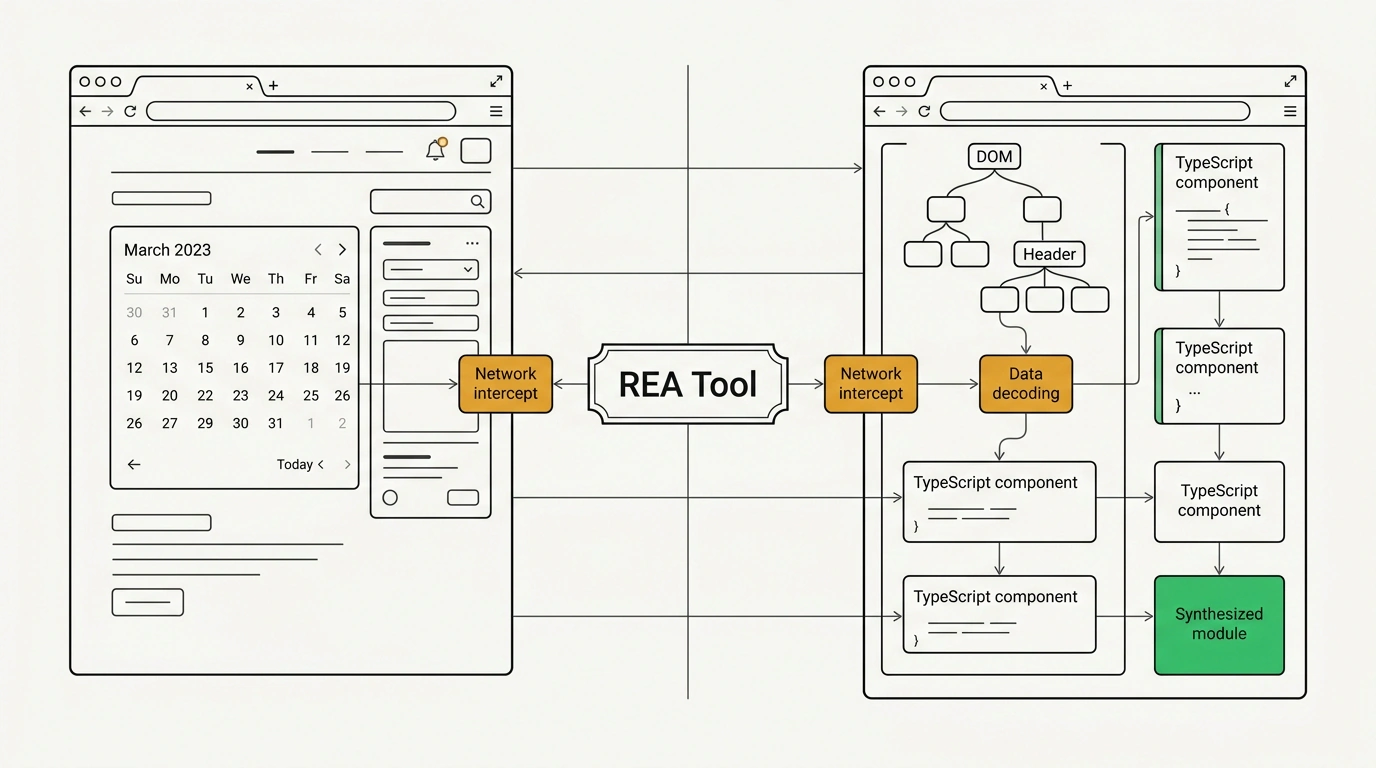
How many times have you spotted a sleek widget in someone else's web app—an interactive meeting scheduler, an audio visualizer, or a smooth screen recorder—and thought, 'I want something like that in my own project'?
Previously, getting there meant hours of tedious work: opening DevTools, digging through the Network tab, untangling minified JavaScript, and rebuilding data structures by hand. We've already looked at how the viral Reverse Engineer Anything MCP server works and why AI agents are better at reverse engineering than designing from scratch.
Today, let's dive into the practical side of the open-source Reverse Engineer Anything (REA) repo (morluto/rea) by morluto, and see how researchers Nate Herk and Julian Goldie pair it with Claude Code to rebuild real components.
The Five-Step Reverse Engineering Protocol
REA connects to Claude Code as a Model Context Protocol (MCP) server. Instead of randomly guessing code from a screenshot, the agent follows a strict five-step research protocol:
- Behavioral Analysis: records user flows, triggers, and UI state transitions.
- Artifact Extraction: captures DOM structure, CSS variables, fonts, local assets, and intercepted network packets.
- String & Endpoint Mining: hunts for internal API signatures, hidden routes, and request header formats.
- Data Contract Decoding: automatically reconstructs TypeScript interfaces and JSON payload schemas.
- Code Synthesis & Edge-Case Hardening: generates a clean, typed component on a modern stack (React, Tailwind, TypeScript) with edge-case handling.
In Julian Goldie's tests, the agent decompiled the availability-slot logic of a Calendly-style booking calendar in minutes. Meanwhile, Nate Herk tested REA on a Loom-style screen-recording extension: the agent pulled out calls to navigator.mediaDevices.getDisplayMedia, wired up stream recording, and built a working component.
Adding the Skill to Claude Code
To add REA to your workflow, register the MCP server in your Claude Code skill settings:
{
  "name": "reverse-engineer-anything",
  "version": "1.2.0",
  "description": "Step-by-step reverse engineering of web UIs and app logic",
  "mcpServers": {
    "rea": {
      "command": "npx",
      "args": ["-y", "@morluto/rea-mcp-server"],
      "env": {
        "REA_WORK_DIR": "./.rea-cache",
        "REA_LOG_LEVEL": "debug"
      }
    }
  }
}
Then kick off decompilation straight from the Claude Code CLI:
claude "Using the REA skill, decompile the screen recorder widget functionality:
1. Inspect the HTML/JS artifact in ./reference-app.
2. Extract getDisplayMedia stream capture and video composition methods.
3. Generate a clean ScreenRecorder.tsx React component with TypeScript types.
4. Add proper error handling when the user denies permissions."
Synthesis Output: A Clean TypeScript Component
Here is a snippet of the working ScreenRecorder.tsx component the agent generates from the extracted artifacts:
import React, { useState, useRef } from 'react';

export const ScreenRecorder: React.FC = () => {
  const [isRecording, setIsRecording] = useState(false);
  const mediaRecorderRef = useRef<MediaRecorder | null>(null);
  const chunksRef = useRef<Blob[]>([]);

  const startCapture = async () => {
    try {
      const stream = await navigator.mediaDevices.getDisplayMedia({
        video: { frameRate: 60 },
        audio: true
      });
      const recorder = new MediaRecorder(stream, { mimeType: 'video/webm; codecs=vp9' });
      recorder.ondataavailable = (e) => {
        if (e.data.size > 0) chunksRef.current.push(e.data);
      };
      recorder.onstop = () => {
        const completeBlob = new Blob(chunksRef.current, { type: 'video/webm' });
        const videoUrl = URL.createObjectURL(completeBlob);
        console.log("Recording ready:", videoUrl);
      };
      recorder.start(1000);
      mediaRecorderRef.current = recorder;
      setIsRecording(true);
    } catch (err) {
      console.error("Screen access denied or API error:", err);
    }
  };

  return (
    <div className="p-4 rounded-xl bg-zinc-900 text-white border border-zinc-800">
      <h3 className="font-semibold text-lg mb-2">Standalone Screen Recorder</h3>
      <button
        onClick={isRecording ? () => mediaRecorderRef.current?.stop() : startCapture}
        className={`px-4 py-2 rounded-lg font-medium transition ${
          isRecording ? 'bg-rose-600 hover:bg-rose-500' : 'bg-indigo-600 hover:bg-indigo-500'
        }`}
      >
        {isRecording ? 'Stop Recording' : 'Start Screen Recording'}
      </button>
    </div>
  );
};
Keep copyright in mind. Blindly copying someone else's visual assets, logos, or obfuscated scripts into a commercial product is illegal. Use REA following Clean Room Design: let the agent study the underlying protocols and data flows, then write your own independent implementation from scratch.
Where the Tool Stops
What can't REA do? It can't peek inside a closed backend server. If business logic runs in a private database or AWS microservices, the agent can only recover the incoming and outgoing JSON formats. Internal server algorithms stay a black box.
For client-side frontends, Chrome extensions, and standalone widgets, though, pairing REA with Claude Code saves huge amounts of engineering time.