Modern frontend frameworks like React, Vue, and Svelte give you tremendous rendering flexibility, but they leave state architecture mostly up to you. In small prototypes, hooks like useState and useEffect feel effortless. As a codebase grows, however, scattered local state and implicit side effects often lead to cascading re-renders, request race conditions, and UI desynchronization.
Developer Devin Jameson offers a different path with Foldkit, a TypeScript frontend framework. It brings the strict discipline of The Elm Architecture (TEA) to TypeScript, building on functional primitives from the Effect library for type modeling, deterministic updates, and strict side-effect isolation.
TEA Architecture and Functional Effect Discipline
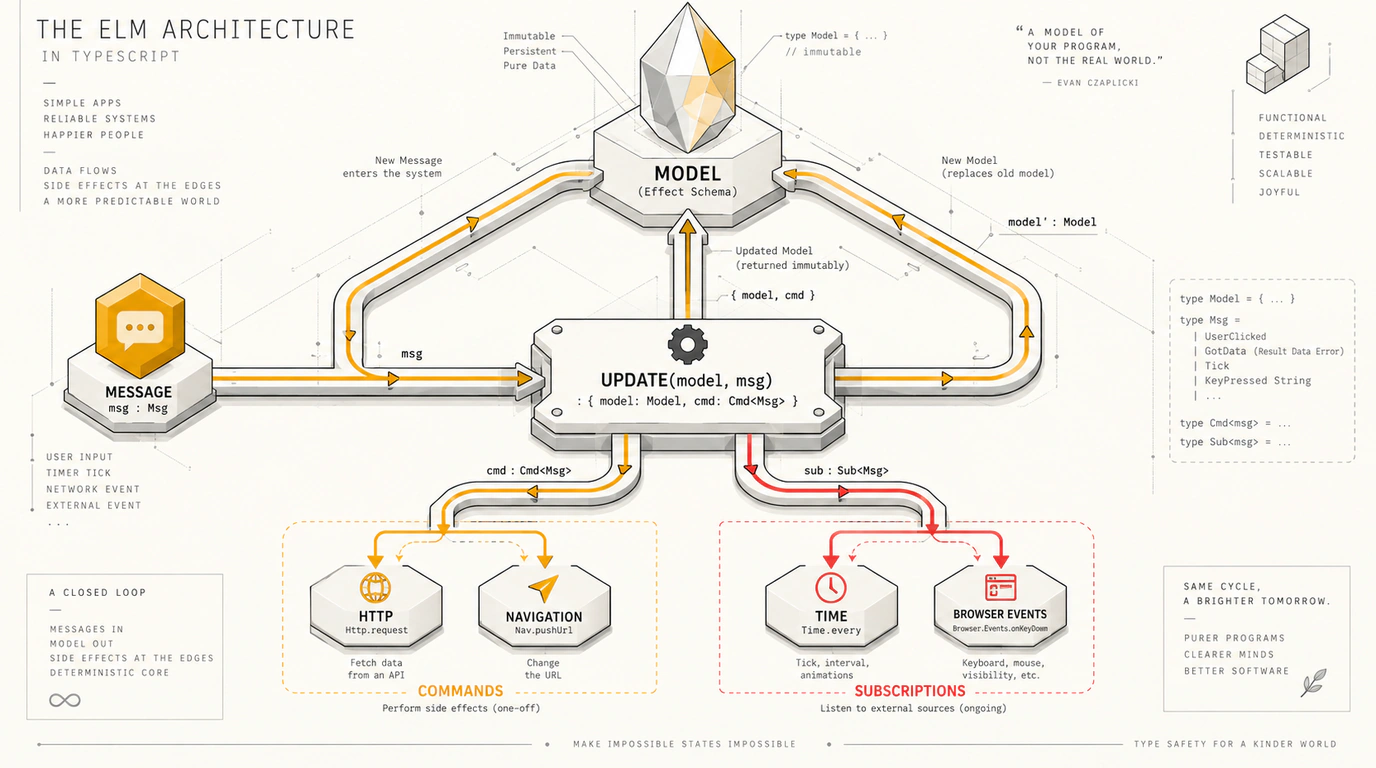
Elm proved in practice that the right architectural model can drive uncaught runtime exceptions down to zero. Classic TEA rests on five clear pillars:
Model: a single, centralized, immutable state tree for the entire app;Message: a strict set of discriminated unions describing every possible event;Update: a pure transition function that takes the current model and a message and returns the next state;Init: the application's initial state;View: a declarative function that renders the UI from the current model.
Foldkit's key twist is implementing this loop with Effect primitives. You define Model using Schema.Struct, which gives you automatic validation and exact TypeScript type inference. Messages are declared with defineMessageUnion, so the compiler enforces exhaustive matching through Message.match. Forgetting to handle a button click or server response becomes a compile-time error.
Side effects no longer hide inside components. Much like backend systems isolate logic with a deterministic pipeline, Foldkit separates side effects into four predictable categories:
Commands: one-off async tasks such as HTTP API calls or LocalStorage writes;Subscriptions: long-lived listeners for external event streams like timers or window resizes;Mounts: logic tied to the lifecycle of specific DOM nodes;ManagedResources: guaranteed acquisition and cleanup of persistent handles such as WebSocket connections.
Practical Example: A Declarative Counter and Entry Point
Here is how a typed counter looks in Foldkit. The src/main.ts module holds only pure business logic:
import { Schema } from 'effect';
import { Runtime, Update } from 'foldkit';
import { Document, HtmlBuilder } from 'foldkit/html';
import { defineMessageUnion } from 'foldkit/message';
import { modifyFields } from 'foldkit/struct';

// 1. Single source of truth backed by Effect Schema
export const Model = Schema.Struct({ count: Schema.Number });
export type Model = typeof Model.Type;

// 2. Exhaustive union of message types
export const Message = defineMessageUnion({
  ClickedDecrement: {},
  ClickedIncrement: {},
  ClickedReset: {},
});
export type Message = typeof Message.Type;

// 3. Pure state transition function with no mutations
export const update = (model: Model, message: Message) =>
  Message.match<Update.Return<Model, Message>>(message, {
    ClickedDecrement: () => ({
      model: modifyFields(model, { count: (c) => c - 1 }),
    }),
    ClickedIncrement: () => ({
      model: modifyFields(model, { count: (c) => c + 1 }),
    }),
    ClickedReset: () => ({
      model: modifyFields(model, { count: () => 0 }),
    }),
  });

// 4. Declarative UI view
export const init: Runtime.ApplicationInit<Model, Message> = () => ({
  model: { count: 0 },
});

export const view = (model: Model, h: HtmlBuilder<Message>): Document => ({
  title: `Counter: ${model.count}`,
  body: h.div([], [
    h.p([], [`Current value: ${model.count}`]),
    h.button([h.OnClick(Message.ClickedDecrement())], ['-1']),
    h.button([h.OnClick(Message.ClickedReset())], ['Reset']),
    h.button([h.OnClick(Message.ClickedIncrement())], ['+1']),
  ]),
});
All browser wiring and DOM mounting live in a separate src/entry.ts file:
import { Runtime } from 'foldkit';
import { Model, init, update, view } from './main';

// Initialize the Foldkit application runtime
const application = Runtime.makeApplication({
  Model,
  init,
  update,
  view,
  container: document.getElementById('root'),
});

// Start the event loop
Runtime.run(application);
This separation lets you unit-test any user flow by calling the pure update(model, message) function directly. You don't need to emulate a browser, spin up jsdom, or mock lifecycle hooks.
AI Agent Compatibility and Where It Fits
One notable detail in Foldkit is its built-in DevTools MCP module (foldkit.dev/ai/mcp), which supports the Model Context Protocol. Because all state lives in a single Model structure and every action is a typed Message, external AI agents can inspect the state graph and edit code without breaking hidden dependencies.
Predictability has a cost, though. Foldkit comes with a steeper learning curve, requires comfort with Effect primitives, and involves more declarative boilerplate than quick React components. The project is also still pre-1.0 with a small community.
For quick landing-page prototypes, Foldkit may feel like overkill. For complex client-side apps, financial interfaces, and enterprise dashboards with hundreds of interconnected states, this strict architecture can save weeks of debugging.
