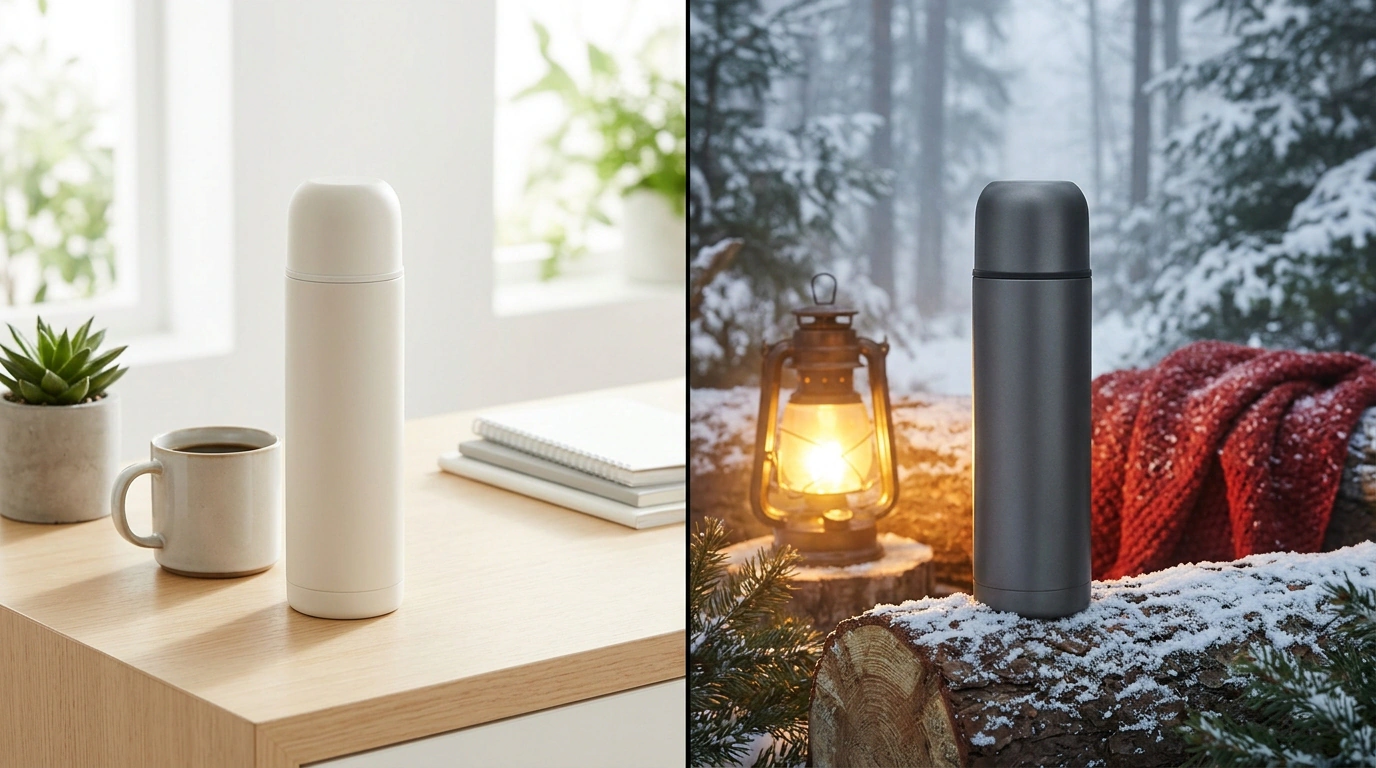
When launching an everyday universal product on Wildberries, storefront packaging runs into an awkward choice. Either you put up one neutral studio photo and hand clicks over to bright niche competitors, or you create separate listings for different angles, artificially splitting reviews, sales history, and warehouse stock.
In the WB Partners dashboard, this problem is solved by the «Фото для целевой аудитории» tool: it shows a separate cover to selected buyers while keeping the base shot for everyone else. In November, the platform relaxed its targeting—as reported by the «WB Партнёры» channel—and the practical upside of this release caught my attention right away. Let’s break down how to configure different main photos for men, women, and regions to lift search click-through rate without burning budget on empty tests.
Why the Old Targeting Fragmented Traffic and What the “All” Filter Changed
Here you’ll reasonably ask: what stopped sellers from splitting covers between men and women earlier if gender and geography were already in the settings? The snag was a rigid field lock: the old setup required exact values for all four attributes at once—gender, age, marital status, and region.
That requirement sliced demand into tiny shards. Take a one-liter steel thermos: to show a winter shot to men in cold regions, you also had to guess their age and passport stamp. A single guy from Novosibirsk and a married dad from Krasnoyarsk landed in different buckets, losing part of the impressions. Now Wildberries lets you select “All” for age and marital status while targeting gender and region specifically.
Target traffic within the needed city and gender no longer gets chopped up by form-field trivia.
The «Портрет покупателя» Report and Cover Scenarios for a Thermos
Broad filters pay off when hypotheses rest on numbers. Before uploading shots, open the «Портрет покупателя» report from the platform’s subscription—its slices are broken down in the guide to buyer portraits and split tests, showing how to check gender, age, and city shares of actual orders. And to test detail visibility on a mockup before launching traffic, use the neural-network «Анализ внимания» in Wildberries’ photo editor.
Let’s test the mechanics on our one-liter thermos. Suppose at launch a studio shot on a gray background yields an average CTR—share of clicks from search impressions—of 3.2%, and the goal is to grow clicks without raising your ad bid. Setting “All” for age and marital status, we launch two segments:
- Women, Moscow and St. Petersburg: a bright cover in a modern office and yoga studio highlighting warm coffee and smoothies lifts CTR to 5.4%.
- Men, Siberia and the Urals: a shot in a snowy forest on a winter fishing trip next to gear—while keeping the base photo for the rest of the country—pushes clicks to 6.1%.
Look at how the listing’s economics shift. Average click-through rate across the two streams reaches 5.8%, and total order volume adds 38% at the exact same search-auction bid. Reviews and stock stayed inside a single listing, yet each audience saw a relatable scenario and delivered more clicks from the same impressions.
Clean Cover Split Testing and Protection Against Pickup-Point Rejections
Only a clean experiment lets you repeat that growth on live traffic. The authors of the SellerDen channel rightly noted: Wildberries publishes neither test outcomes nor average lifts by category. In my opinion, that’s the main signal for a seller—you have to verify every hypothesis on your own dime.
The dashboard tracks impressions, clicks, add-to-carts, and orders separately for each cover. To avoid fooling yourself with the numbers, stick to the one-change rule: freeze price and description, change one audience attribute per cycle, and compare equal periods, spotting funnel bottlenecks via the breakdown of listing search analytics. And never photoshop an absent pouch or carabiner onto the thermos just for a click—upon inspection at the pickup point, that turns into a rejection.
A high CTR built on broken expectations only brings bills for reverse logistics.
Don’t turn photo targeting into an assembly line of a dozen covers for every city. A sense of proportion protects your margin: pick one or two large segments in «Портрет покупателя», test an honest product presentation without jerking the price around, and keep only the shots that grow buyouts rather than empty clicks.