Your ad specialist gathered keywords, launched campaigns, and drove targeted clicks—yet a month later the lead sheet is empty. The first instinct is obvious: the contractor failed, time to replace them. You relaunch with a new specialist, and a month later the exact same numbers repeat.
On the owner's laptop, the site looks great: pages load fast, buttons click, the design feels fresh. Yet developer Anton Lagunov from Weborika.Lab and ad specialist Ivan NemceFF show where budgets leak after the click. The developer checks that a button works, the ad manager owns traffic, and nobody watches the seams where bounce rate spikes—meaning visitors leave the first page without taking any action.
Before firing your specialist, tap a live ad link from a clean smartphone and compare goals in Yandex Metrica against real leads in your CRM.
Ad Promises Crash Into the Catalog and Inventory
The first breakdown happens right at the door: a visitor searches for winter tires in an exact size, clicks a matching ad, and lands in a generic catalog. There, they have to pick season, diameter, width, and brand all over again. If filters aren't saved in the URL and reset on ad entry, you pay for a hot, specific query and greet the buyer with an empty shelf.
The second leak hits multi-region stores. The ad promises a great price, stock availability, and two-day delivery, but the site's geolocation switches the city, assortment, price, or delivery window. Sync delays with 1C and warehouse inventory cause a similar failure: an item sold out or jumped in price, while ad feeds still broadcast the old promise.
The third issue punishes buyers who already reached checkout. Someone spends ten minutes picking items, only to discover at checkout a 5,000 ₽ minimum order, no delivery to their city, or hidden surcharges. In B2B, a buyer configures equipment and finds out at the end that the company only sells wholesale to legal entities. Those terms are fine—just show them upfront on the page and in the ads themselves.
It Flies on Your Laptop, Yet Breaks on the Client's Phone
The fourth cause hides in mobile clicks: even on a simple landing page without a catalog, visiting directly from your office PC with saved cookies looks nothing like a live ad click. A buyer taps from the Yandex app or a mobile in-app browser. Extra UTM parameters in the URL can break redirects, and a regional pop-up can cover the entire narrow screen. In-app browsers also glitch on logins, payments, forms, and messenger buttons, so always test the live ad link on a clean phone with no cache.
The fifth breakdown shows up in long-cycle niches: furniture, construction, equipment, and B2B services. Buyers compare options, consult family or a boss, and return two days later. If their cart emptied, filters reset, and they can't share a shortlist, they leave.
Here, persistent carts, favorites, browsing history, model comparisons, downloadable quote PDFs, and shareable filter URLs save the deal. For an equipment supplier, a "send selection to director" button works far better than a discount pop-up.
The Form Says "Thank You" While the CRM Stays Silent and Direct Trains on Junk
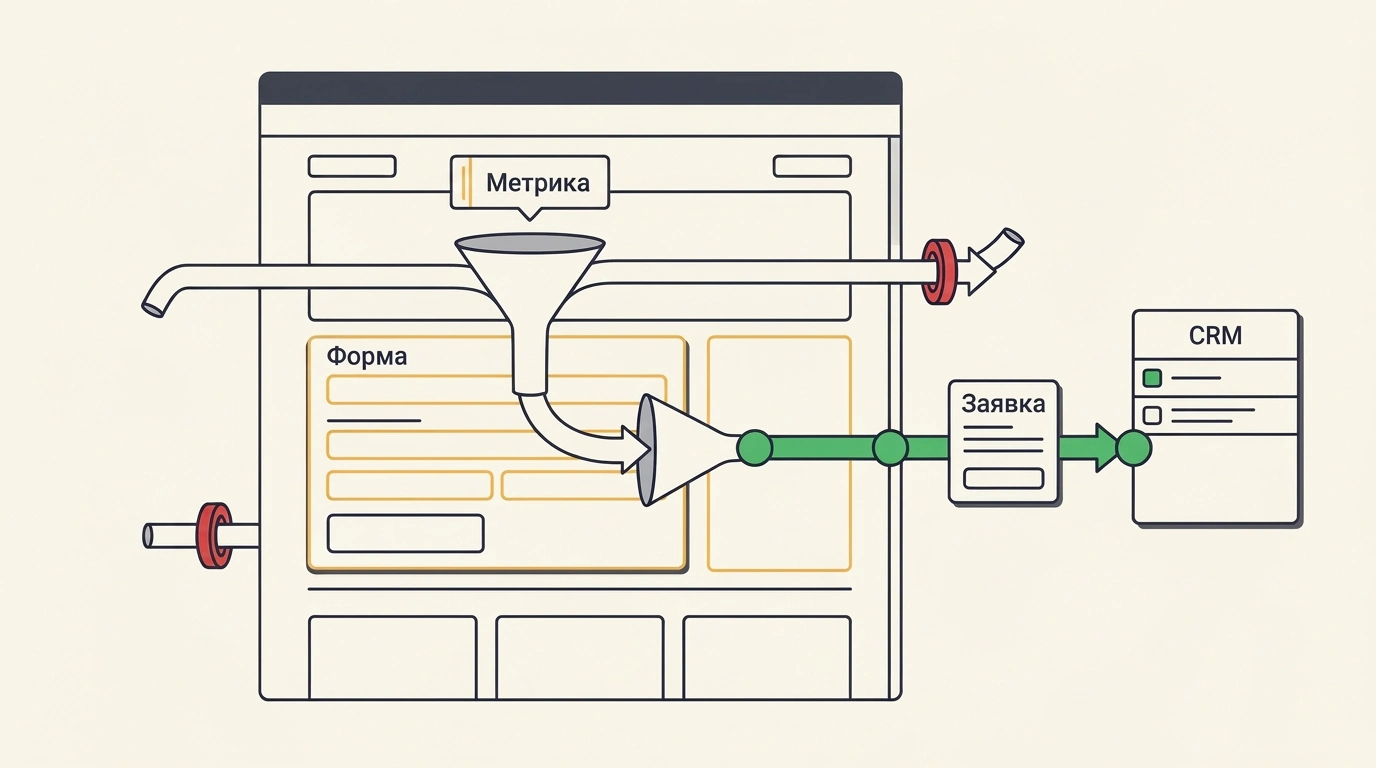
The sixth—and sneakiest—bug looks like success. A visitor submits a form, sees "Thank you, your request has been sent," and waits for a call. Metrica counts a goal, the ad manager celebrates the report, and the sales team's CRM stays empty.
The causes are often mundane: an expired integration token, a new required field in the CRM, a rejected email on the mail server, or leads landing in the wrong pipeline. Test every form all the way to a manager's CRM card, and store backup copies of leads on your website in case the external CRM hiccups.
The seventh cause breaks ad optimization itself. When Yandex Direct optimizes for a click on the "Submit" button, the goal fires even on validation errors—no phone entered, nothing sent, yet the algorithm gets a success signal. A second skew comes from counting spam and off-topic questions alongside real deals: cost per lead drops in reports while sales stay flat. Proper end-to-end analytics sends only qualified leads and paid orders from the CRM back to the ad platform.
How to Rebuild the Page and Forms: An Escape-Room Case Jumping From 7 to 29 Leads
Ivan NemceFF's breakdown includes a telling case for an escape-room business: in week one, ads brought 7 leads. After getting access to Tilda and rebuilding the page structure and lead forms, week two brought 29 inquiries. The author notes honestly that the case only gives raw weekly lead counts without visit totals, ad spend, seasonality, or paid bookings, so true conversion rate must always be measured against total visits and verified with sales.
A high-converting landing page is built around an easy next step on every screen. The first screen—visible immediately without scrolling—answers four questions: what the service is, who it's for, how much it costs, and why to trust you. Keep a clickable phone number and "Request a call" in the header, and place "Calculate price" (to the quiz) and "Download price list" (to a short form) below. Add a clear note nearby: "Take a short quiz and get a price quote in MAX, Telegram, or WhatsApp."
Right below, place an open quiz form—a step-by-step survey shown directly on the page rather than hidden behind a button, so visitors see question one immediately. Five to six questions are enough: start with the task and service, ask second-to-last which channel they prefer (MAX, Telegram, WhatsApp, or a call), and require only name and phone at the end. Leave email optional so you don't cut conversion; promising a quote in a messenger removes the fear of pushy sales calls.
For visitors who dislike quizzes, keep short paths open: "Download price list" asks only for a phone and messenger to send a PDF, while "Request a call" handles voice inquiries. After case studies on a long page, add a static form for warmed-up readers. If someone spends 120 seconds on the page without submitting, trigger an exit/time pop-up—"Don't leave empty-handed"—offering a price list or checklist via messenger, and hide it permanently once they submit. On Tilda, redirect successful submissions to a "Thank you" page; in the escape-room case, that page let users pick a game and book online right away without waiting for a manager.
What if you don't have a PDF price list ready yet—can you still put that button up?
NemceFF notes that some capture phone numbers for a non-existent price list and have managers handle the objection by script. For trust, though, that's risky: a customer left their number for a file and gets a call full of excuses instead. It is far safer to spend half an hour putting together a simple PDF with a price range.
Metrica Audit Protocol Before Scaling Your Budget
Both authors agree on one point: clicking Submit doesn't equal a lead. Per Yandex Metrica's documentation, the "Form submission" auto-goal triggers on a technical HTML <form> submit event. When fields are validated with JavaScript or AJAX, it counts a conversion even if the user skipped a required field, hit an error, and sent nothing.
Instead of the auto-goal, set up a "JavaScript event" goal (ym(XXXXXX, 'reachGoal', 'FORM_SUCCESS')) strictly inside the server's success callback, or on Tilda use a "Page visit" goal on a dedicated thank-you URL like /success/.
Pre-Launch Website Checklist Before Turning On Yandex Direct
- Tap a live ad link with UTM tags from a clean smartphone to test redirects, pop-ups, and every form submission.
- Match ads, feeds, stock, prices, and geolocation on the site; display minimum order rules and terms before checkout.
- Verify that filters stay in the URL and carts or shortlists survive when a buyer returns days later.
- Run a test lead through each form into a CRM card and set up local lead backups on the website.
- Replace the 'Form submission' auto-goal with a server-confirmed JavaScript event or a 'Thank you' page, and feed qualified leads and payments back from the CRM.