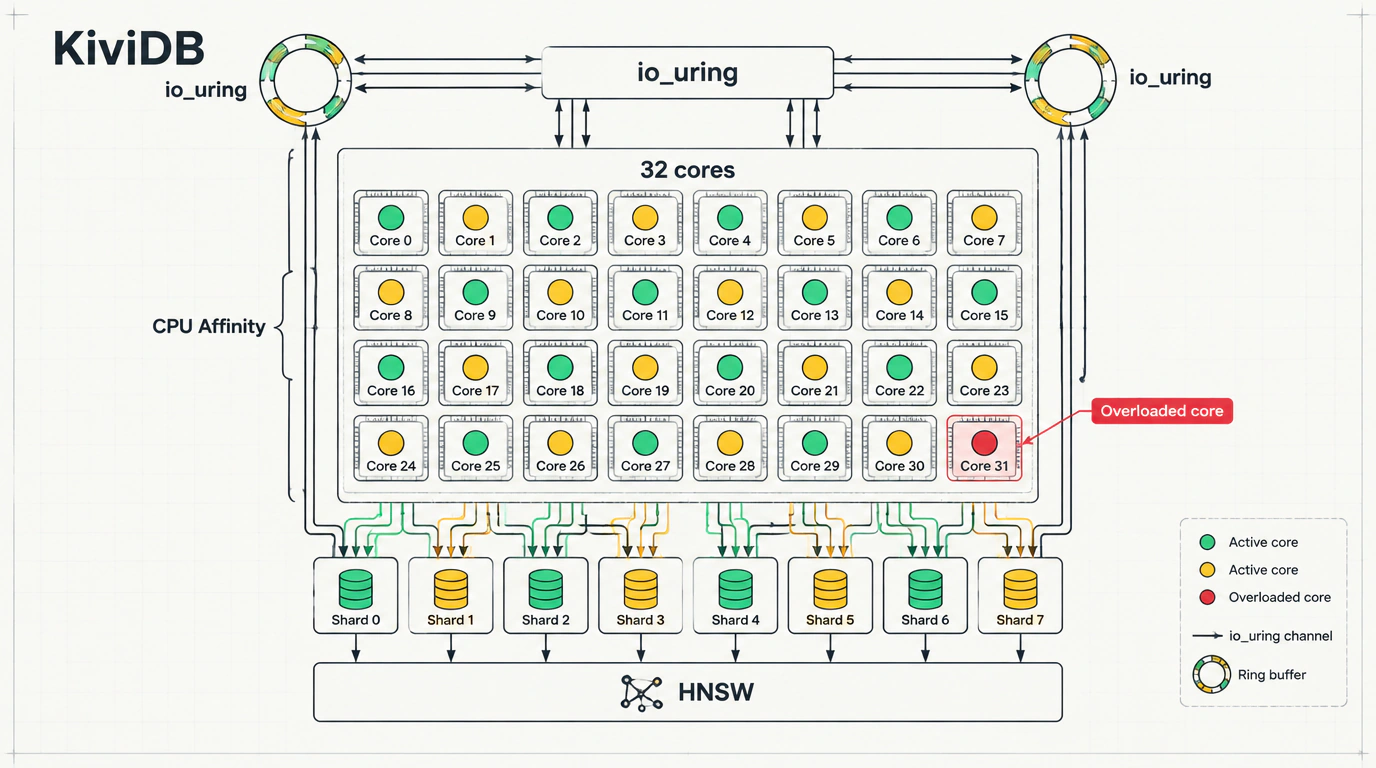
Picture a classic evening on-call scenario: traffic hits its daily peak, API response times suddenly creep upward, and your p99 latency graphs turn an alarming shade of red. You SSH into the server, open htop, and stare at a painfully familiar paradox: a single CPU core is pegged at 100%, while the other 31 cores of your beefy 32-core processor sit completely idle.
Every backend engineer knows the culprit behind this drama: the legendary Redis. Back in 2009, Salvatore Sanfilippo designed Redis around a single-threaded event loop. No mutexes, dead-simple C code, and strict atomicity. The catch is that server hardware has long since scaled by adding cores, yet our favorite Swiss Army knife is still locked inside the boundaries of a single thread.
That architectural bottleneck is what KiviDB sets out to solve—a new open-source in-memory store with built-in search, written in Rust. Let's look under the hood to see how this database works and where the trade-offs lie.
The Single-Core Ceiling: The Price of Clustering
Once a single Redis core hits 100%, you are left with two options: live with the queueing or spin up Redis Cluster. Running a cluster on a single physical machine, however, carries a noticeable engineering tax:
- You have to configure network routing across dozens of processes and manage ports from 6379 to 6410;
- Any multi-key operation like
MGETor a transaction requires all keys to live in the same hash slot, forcing you to sprinkle hash tags likeuser:{1001}:profileeverywhere; - Client libraries in your application code must track node topology and handle
MOVEDredirects.
Here is a simple analogy: imagine a supermarket with 32 checkout lanes, where only one cashier is actually working. Setting up Redis Cluster on one box is like building thirty separate kiosks with fences around them instead of just putting cashiers at the neighboring registers.
Forks like Valkey stayed faithful to the classic architecture for compatibility, while Dragonfly bet on C++. KiviDB tackles the problem using Rust's memory model.
Sharding by Core and io_uring Magic
At its core, KiviDB uses a sharded-by-core in-memory design. The keyspace is split into independent partitions, and each worker thread is pinned directly to a dedicated CPU core (CPU affinity).
When a batch of commands arrives, KiviDB routes each key straight to the thread that owns that memory partition. Because every thread has exclusive ownership of its shard, KiviDB needs no global locks or mutexes internally.
On Linux, network I/O runs on the asynchronous io_uring system interface via the tokio_uring crate. Instead of constantly context-switching between user space and the OS kernel, KiviDB exchanges data with the kernel through ring buffers. If io_uring is blocked by security policies, the runtime automatically falls back to Tokio.
KiviDB transparently implements both RESP2 and RESP3 binary protocols. Standard clients (redis-py, go-redis, BullMQ, or Celery) connect without a single line of code changed. By default, KiviDB listens on port 6380, making it easy to run side-by-side with a production Redis instance for testing.
Built-In HNSW Vector Search
With RAG pipelines everywhere, developers increasingly need to search for semantically similar document vectors. Usually, that means spinning up a separate vector database (Qdrant, Milvus) or heavy extensions.
KiviDB ships with a built-in vector and full-text search engine compatible with Redis Stack syntax (FT.*). It supports both FLAT (exact scan) and HNSW (graph-based approximate nearest neighbor) indexes. Vectors are stored as FLOAT32 inside standard HASH structures.
Here is a clever engineering touch: unlike systems that spend hours rebuilding the vector graph from scratch on restart, KiviDB serializes the precomputed HNSW graph directly into its dump.kdb snapshot when you run SAVE. On restart, the ready-to-use graph loads in seconds. An append-only file (--aof) is also supported for durability.
Battle-Tested: Setup and Benchmarks
Let's spin up a test instance with Docker and verify the connection:
# Start a KiviDB container on port 6380
docker run -d --name kividb-test -p 6380:6380 kividb/kividb:latest

# Verify the connection and write data over the RESP protocol
redis-cli -p 6380 SET user:1001:session '{"role":"developer"}' EX 3600
redis-cli -p 6380 GET user:1001:session
Now let's create an HNSW vector index and run a 5-nearest-neighbor search (KNN 5):
# Create an HNSW index for 4-dimensional vectors
redis-cli -p 6380 FT.CREATE idx:articles ON HASH PREFIX 1 article: SCHEMA \
  title TEXT embedding VECTOR HNSW 10 TYPE FLOAT32 DIM 4 DISTANCE_METRIC COSINE M 16 EF_CONSTRUCTION 128

# Insert an article and run vector search
redis-cli -p 6380 HSET article:42 title "Шардинг" embedding "\xcd\xcc\xcc=\xcd\xccL>\x9a\x99\x99>\xcd\xcc\xcc>"
redis-cli -p 6380 FT.SEARCH idx:articles "*=>[KNN 5 @embedding $vec]" PARAMS 2 vec "\xcd\xcc\xcc=\xcd\xccL>\x9a\x99\x99>\xcd\xcc\xcc>" DIALECT 2
On a 32-core AWS Graviton3 c7gn.metal instance with pipelining enabled, KiviDB hit 21.2 million GET/s and 19.2 million SET/s—outpacing Dragonfly 2.0.2 (9.1 million GET/s) by 2.3x and Redis 8.10 (2.4 million GET/s) by nearly 9x. Under a load of 1,600 concurrent clients, p99 latency was 13.9 ms compared to 33.9 ms for Dragonfly and 72.1 ms for Redis.
We previously looked at a related memory-management challenge in Fault-Tolerant Stateless ArgoCD on Bare-Metal Kubernetes, where cache reliability directly affected controller stability.
Caveats and Where It Fits
Before jumping into production with KiviDB, keep four practical caveats in mind:
- AGPL-3.0 license: Network clients do not trigger copyleft obligations, but many enterprise security teams ban AGPL software outright in their infrastructure.
- seccomp profile: Getting full
io_uringspeed in containers requires--security-opt seccomp=unconfined, which takes extra sign-off in locked-down clusters. - Cross-shard operations: Commands touching keys across different partitions require inter-thread synchronization, eating into the sharding advantage.
- Project maturity: At version 1.1 (around 800 GitHub stars), production battle-testing is still in its early days.
Run KiviDB on backup port 6380 and mirror a slice of production read traffic through a proxy. You will see how it behaves under your real-world workload without risking user-facing traffic.