How many times a workday do you repeat this mechanical routine: you ask a neural network to draft a commercial proposal, presentation outline, or financial plan, get a long wall of formatted text in chat, select it with your mouse, open Word, Google Docs, or PowerPoint, and start painstakingly fixing margins, fonts, headings, and table borders?
Text chat is modal and linear. It is great for quick Q&A, yet completely unsuited for thoughtful document work where visual page structure matters.
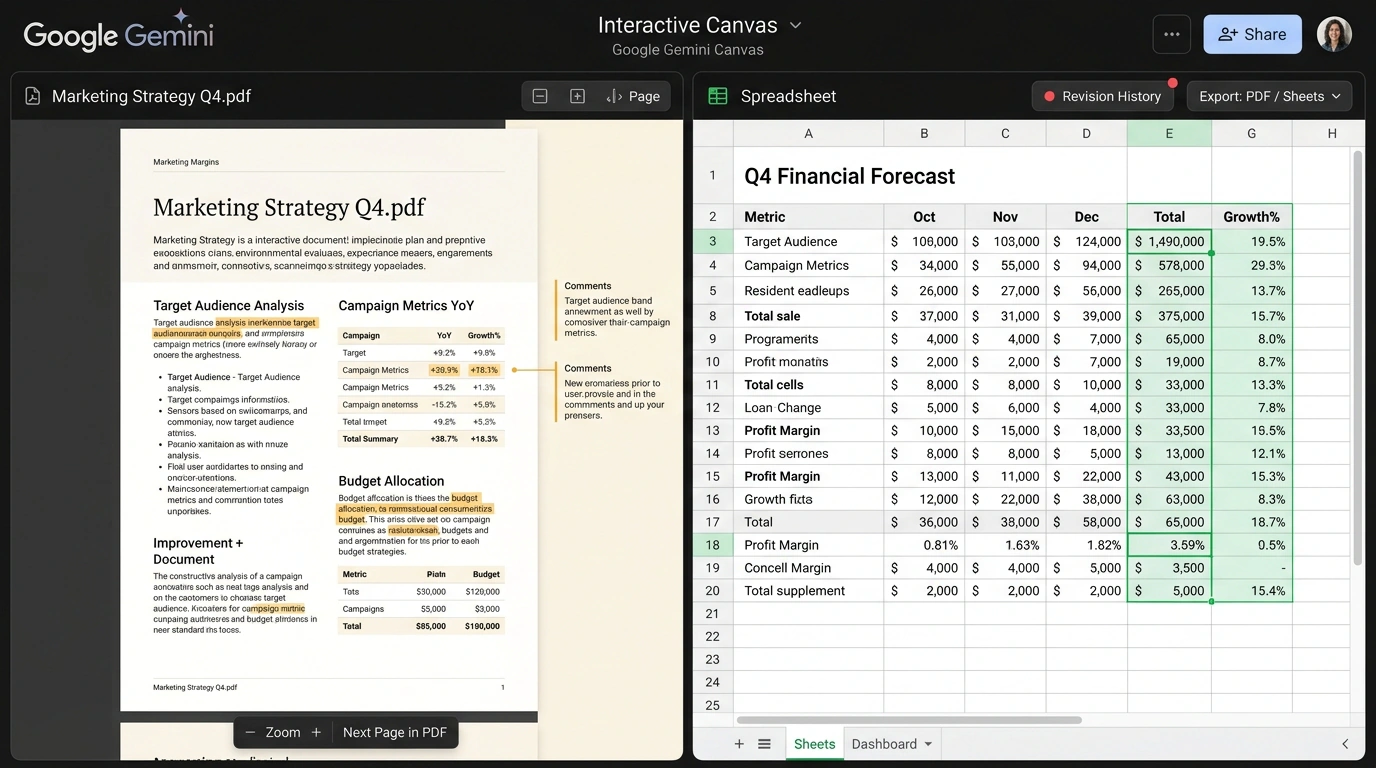
To eliminate this perennial gap between generating an idea and formatting the deliverable, Google rolled out a major interface update—Gemini In-Chat Document Canvas. Now the conversation window splits into two equal panes: the familiar model chat stays on the left, while an interactive working canvas opens on the right, rendering multi-page PDF documents, slide decks, and spreadsheets in real time.
Earlier, we explored Google Slides generation and PDF transformation in Canvas, and today we will look at how the new functionality speeds up everyday office routines.
Two-Way Data Binding: From Dialogue to Layout
The main engineering highlight of In-Chat Canvas is Two-Way Binding between chat text and graphical objects on the canvas.
This shows up at every step of the workflow:
- Click-to-edit precision: You can highlight a specific paragraph on the canvas or a single slide in a presentation and type in chat: "Make this point more persuasive for the CFO and trim it to two sentences." The model updates only the selected block without rewriting the entire document.
- Direct manual editing: You don't have to ask the neural network to fix a typo or change a counterparty's surname—the canvas works as a full-fledged WYSIWYG editor where you can type directly at any moment.
- Interactive slides: Presentations render as a live strip of cards you can drag-and-drop to reorder, restyle with new color schemes, and enrich with vector icons via text prompts.
- Reactive tables: When you change numbers in an interactive table on the canvas, Gemini automatically recalculates dependent formulas and updates linked charts on adjacent slides.
Under the Hood: Vector Renderer and OOXML Standards
To keep generated files from turning into a mess when opened in third-party office suites, Google moved the Canvas engine to standardized OpenDocument and OOXML (Office Open XML) formats.
When you download the final document as .docx, .pptx, or .pdf, the file is not produced via a crude web-page-to-raster conversion, but compiled according to strict typographic rules:
- Proper heading styles (Heading 1, Heading 2) are preserved, allowing automatic table-of-contents generation.
- Tables export with accurate cell properties, auto-fitted column widths, and formula support.
- Vector charts retain editable numeric series in Excel or Google Sheets.
- Built-in corporate themes (Executive Dark, Modern Clean, Vibrant Tech) enforce a unified color palette, typographic scale, and margins across the entire document.
Layered vector PDF structure lets you send created materials straight to print or route them through official corporate legal workflows. In demos, Google showcased an end-to-end three-day workflow for preparing a company's quarterly report: from dumping scattered notes and sales spreadsheets to interactively polishing a boardroom presentation without switching once between third-party apps.
Sync works in reverse too: if you upload an existing multi-page corporate financial report as a PDF into Canvas, the neural network unpacks it into constituent blocks in seconds. You can immediately ask questions about specific tables, request a comparative bar chart of key expense items from last year, or rewrite takeaways for an internal company digest.
Where Limitations Lurk and How to Work Around Them
Despite the massive leap in convenience, I recommend keeping a few nuances in mind when handling complex documents:
- Multi-page PDFs with non-standard layouts: If the source document uses an intricate three-column magazine layout with text wrapping around images, Gemini may simplify the structure into sequential blocks when importing into Canvas.
- Macro-heavy formulas: When generating spreadsheets, the model handles standard functions (
VLOOKUP,SUMIFS,COUNTIF) effortlessly, but complex custom Google Apps Script logic is not yet supported inside Canvas. - Access permissions: A Canvas session inherits the current Google Workspace account's permissions, so when collaborating it is important to watch who has access to the conversation link.
Google Gemini In-Chat Canvas turns a neural network from a text advisor into a full-fledged executive assistant, sparing specialists from hours of mindless mechanical document formatting.