Picture the scene: it is 3:00 a.m., and on-call monitoring is lighting up like a Christmas tree. The database drops into emergency read-only mode, and the web server is throwing No space left on device (ENOSPC) errors. You SSH in, run df -h, and see the root partition sitting at a flat 100%.
The fix seems obvious: find the fattest log file in /var/log/ and nuke it with rm -f. You happily delete a 40 GB file, run df -h again... and freeze in disbelief. Used space hasn't budged by a single kilobyte. You run du -xsh /, and it reports that visible files only take up 50 GB out of 100 GB available. Where did the other 50 gigabytes go?
I covered kernel and filesystem architecture in detail in The Big Linux & Bash Handbook: From Kernel Architecture to Debugging. Now let's look at the physics of this exact incident at the VFS syscall level.
File Descriptor Physics: Why rm Doesn't Free Disk Blocks
On Linux, a file physically consists of two parts:
- A directory entry (the filename and a pointer to an inode number).
- The inode itself and the data blocks it points to on storage.
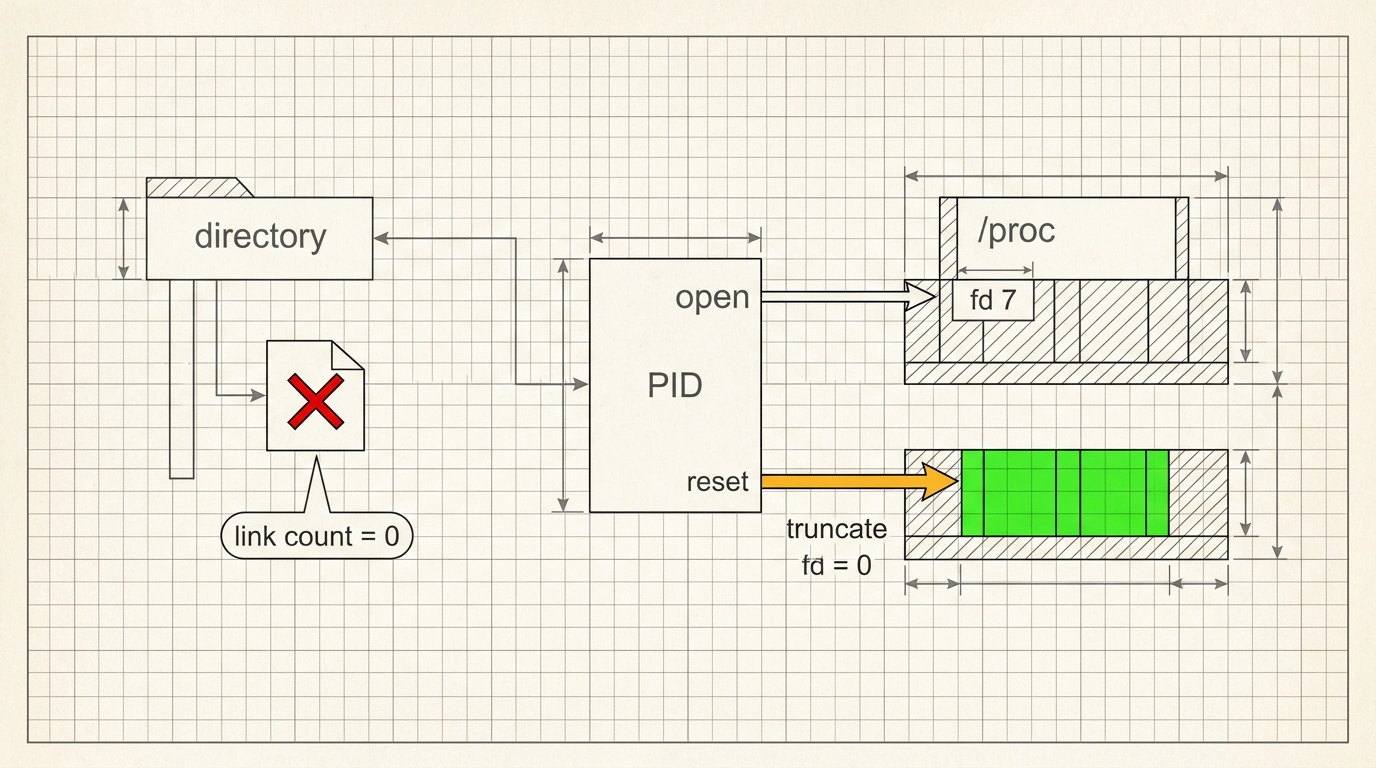
Running rm simply invokes the unlink() system call. It removes the filename entry from the directory and decrements the hard-link count (nlink). However, the kernel only frees the actual disk blocks when two conditions are met:
- the link count
nlinkreaches zero; - every process has closed its open file descriptor for that file.
If your service (Java, Nginx, PostgreSQL, or ClickHouse) was still writing to that log when you deleted it, the descriptor stays open. The file turns into an invisible "ghost" (an unlinked deleted file). The du utility walks the directory tree and simply cannot see it. Meanwhile, df queries the filesystem superblock (statvfs), which faithfully counts every allocated block. Worse still: the process keeps writing to that open descriptor, and your disk keeps filling up!
Finding the Culprit and Rescuing the Server Without a Reboot
The blunt-force fix is to reboot the server or restart the offending service. But if that box is a distributed database primary or a core load balancer, a restart means unacceptable downtime.
Instead, we take the clean engineering route and audit open descriptors with lsof:
# 1. Check disk usage percentage
df -h /

# 2. Find processes holding deleted files (+L1 = Link count < 1)
sudo lsof -nP +L1 / | grep -i deleted

# Sample output:
# COMMAND   PID USER   FD   TYPE DEVICE        SIZE/OFF   NODE NAME
# java     1420 root    7w   REG  253,0  42949672960 134212 /var/log/app.log (deleted)
From the output, we can see that process PID 1420 is holding the file open via file descriptor 7.
Here is the neat part. The Linux kernel's virtual filesystem exposes every running process's descriptors under /proc/<PID>/fd/. We can truncate the held file down to zero bytes on the fly without stopping the application:
# Truncate the file to zero via its descriptor in /proc
sudo truncate -s 0 /proc/1420/fd/7

# Alternative using shell redirection:
# sudo sh -c ": > /proc/1420/fd/7"

# Verify that blocks are freed immediately:
df -h /
# Result: disk usage drops straight from 100% down to a safe 55%!
What If You Ran Out of Inodes Instead of Gigabytes?
Sometimes the reverse happens: df -h shows 30 GB free, yet every attempt to create a file fails with the exact same No space left on device error. When that happens, check whether you exhausted your inode pool:
# Check inode pool usage
df -i /

# If IUse% = 100%, hunt down directories packed with millions of tiny files (cache, sessions):
sudo find / -xdev -type d -size +1M 2>/dev/null
To keep logs from filling the disk, teams configure logrotate. Many reach for the copytruncate directive out of habit. Keep in mind how it works in two steps: first it copies the entire file, then it truncates the original. On high-traffic systems, any log lines written by the application between the end of the copy and the truncate call are lost forever! For critical services, it is much safer to reopen descriptors via a signal using a postrotate block with systemctl reload <service>.
Keep this lsof -nP +L1 and truncate /proc/<PID>/fd/<FD> combo in your toolkit: when things go sideways at night, it will save you from panic and keep production online.