If you've ever tried trusting an autonomous agent (whether Claude Code, Cursor Composer, or a custom LLM-based script) to interact with a real website, you probably remember that mixed feeling of awe and helplessness. On one hand, the model can reason and build complex plans. On the other, trying to get it to click an ordinary button in a browser turns into engineering torture.
The classic approach relies on battle-tested automation libraries: Playwright, Puppeteer, or Selenium. Here's the catch: these monstrous tools were originally built for end-to-end testing by human developers in Node.js or Python. When an agent has to spin up a heavy runtime for every trivial step, wait for a cold process start, dump gigabytes of raw HTML full of hundreds of <div> wrappers, and try to compute an intricate XPath, two disasters strike: response latency balloons to tens of seconds, and the model's context window instantly fills up with visual garbage.
To break this vicious cycle, the research team at Vercel Labs introduced the open-source project agent-browser—an ultra-fast Rust CLI utility designed specifically for agentic workflows. The project has already trended in the Best of JS catalog and gained official documentation at agent-browser.dev.
Client-Daemon Architecture: Forgetting About Cold Starts
The key architectural breakthrough behind agent-browser is the complete separation of the command-line interface from actual browser control.
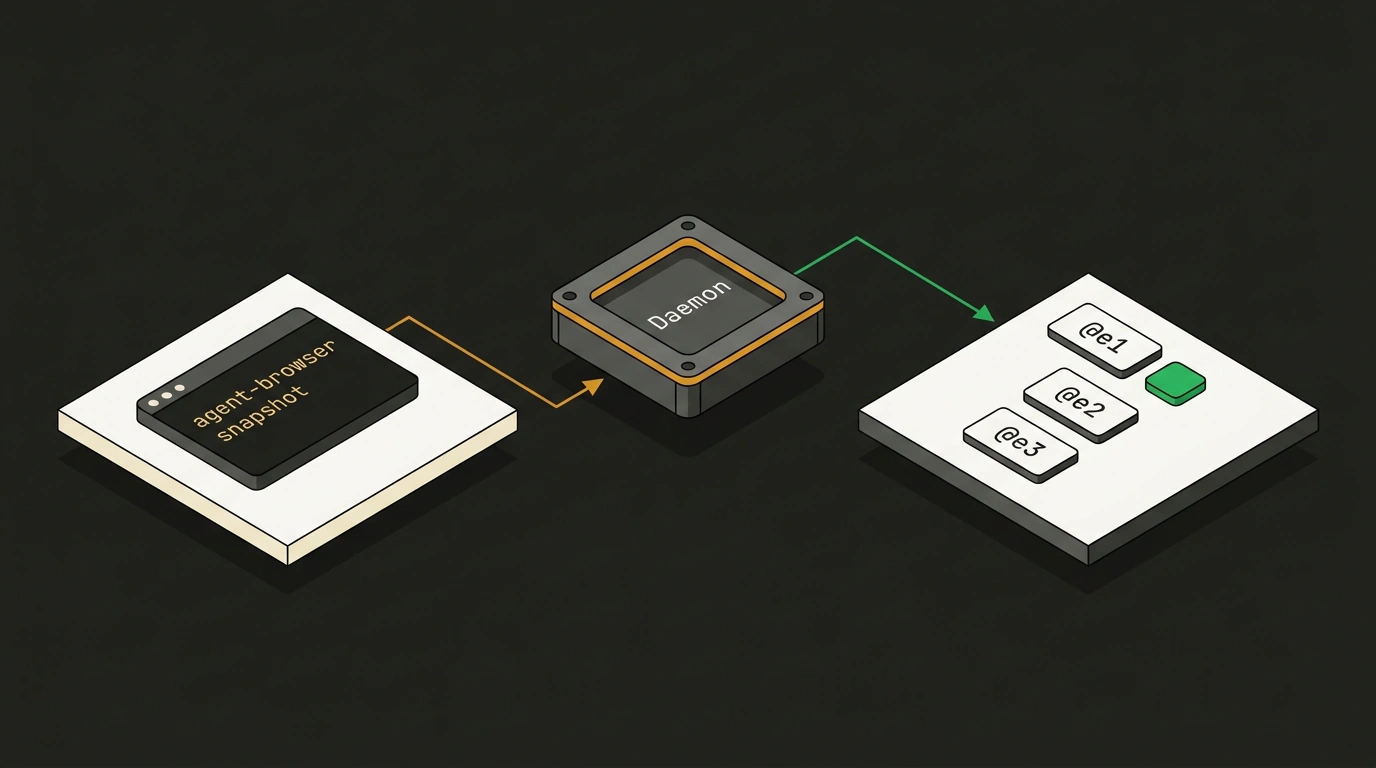
When an agent invokes a page-opening command for the first time, the CLI silently launches a lightweight background daemon process in the OS. This daemon starts a headless instance of Chrome for Testing and keeps a persistent connection open over the Chrome DevTools Protocol (CDP).
# Install the global binary via npm or Homebrew
npm install -g agent-browser
agent-browser install

# Open a site: the first run automatically starts the background daemon
agent-browser open https://news.ycombinator.com

# All subsequent commands execute in milliseconds without restarting the browser
agent-browser get title
The daemon monitors idle time on its own: if no commands arrive from the agent for an hour, the session gracefully terminates and resources are freed. Meanwhile, the agent doesn't waste seconds restarting the browser between reasoning steps: commands like clicks, text input, or scrolling fly over the open socket with near-zero latency.
Accessibility Tree Instead of Gigabytes of DOM: Saving 50x Tokens
The second major problem for browser agents is context cost. Feeding the raw markup of a modern e-commerce page to a language model sends anywhere from 50,000 to 150,000 tokens into the context. At flagship model prices, a couple of those requests will quickly bankrupt a developer.
The agent-browser engineers approached the problem from the angle of digital accessibility (a11y). Instead of HTML, the utility generates a compact snapshot of the accessibility tree using the snapshot -i command:
# Get an interactive accessibility tree with references
agent-browser snapshot -i
The console returns ultra-concise text stripped of styles, scripts, and decorative tags:
- heading "Hacker News" [level=1]
- link "new" [ref=@e1]
- link "past" [ref=@e2]
- link "comments" [ref=@e3]
- textbox "Search" [ref=@e4]
Each interactive element is assigned a short reference: @e1, @e2, @e3. The language model reads the structure instantly, spending 20–50x fewer tokens on it. Best of all, the agent no longer needs to generate fragile selectors like div.container > form > input[type="text"]. It simply commands:
# Click a link and enter text using a stable element identifier
agent-browser fill @e4 "Rust web tools"
agent-browser press Enter

# Check the updated URL after navigation
agent-browser get url
agent-browser close
This approach solves another common automated testing headache: clicking via the accessibility tree fails if the button is physically covered by a cookie consent banner or is invisible. The agent receives a clear signal about the issue and can intentionally close the blocking popup.
Built-in MCP Server and Cloud Farm Support
The tool's creators didn't lock it into a proprietary protocol. Out of the box, agent-browser mcp turns the utility into a standard Model Context Protocol server over stdio streams. That means you can wire it up to any MCP-compatible assistant in literally two lines of configuration.
Moreover, the developers built in support for a wide variety of infrastructure scenarios:
- Local connection to an already-open developer browser via the
--auto-connectflag or an explicit--cdp 9222port; - Running lightweight specialized engines like Lightpanda (an ultra-fast C++ engine) or Obscura;
- Emulating mobile Safari through the native iOS simulator;
- Delegating sessions to cloud browser farms (Browserbase, Browserless, Kernel) when massive parallel scraping is needed.
We explored this architectural shift in detail in our piece on Browser Use and autonomous web loops, which discussed the limits of CDP and workspace isolation. agent-browser clearly demonstrates that the future of agentic automation lies not in heavy script wrappers, but in small, fast native binaries that know how to speak a language the model understands.
Pitfalls and Scope Limits
Despite the obvious benefits, you need to keep the tool's specifics in mind when designing agents on top of agent-browser:
First, element references like @e1 are tied to a specific snapshot. If a site is built as a reactive Single Page Application and a click triggers asynchronous data loading, the agent must call agent-browser snapshot -i again. Attempting to click a stale reference will return an invalid node error.
Second, session security. If an agent logs into corporate services and saves cookie profiles via the --session flag, it's critical to configure strict action policies so the agent doesn't accidentally navigate to a phishing site mid-task and leak saved credentials.
Still, for 95% of routine tasks—from price monitoring to form autofill—the pairing of a native Rust daemon and the accessibility tree looks like the most elegant and cost-effective solution in the ecosystem today.