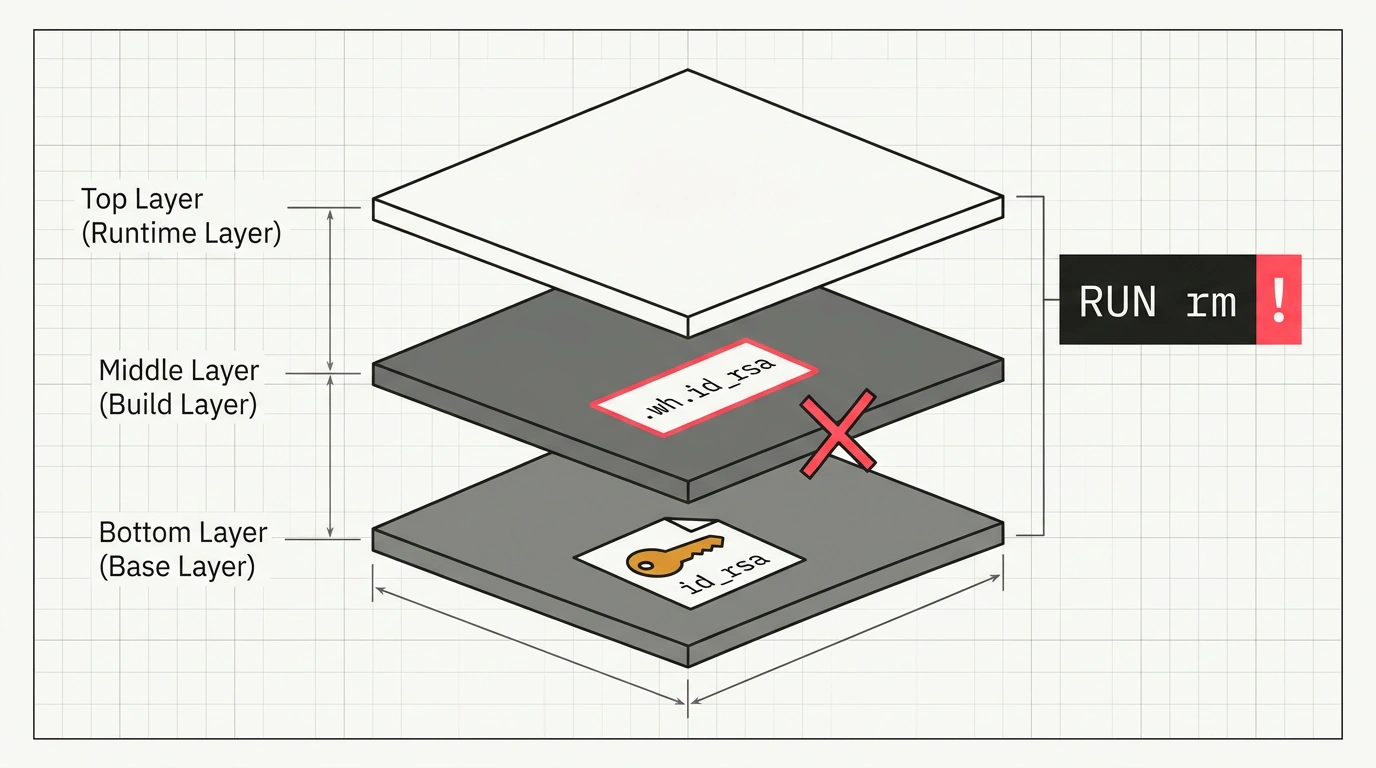
How many times have you seen this pattern in someone else's repo—or caught yourself wanting to do the same: during a container build, you need to download a private npm package, pull a binary over an API, or authenticate against a protected database. A developer copies an SSH key or token file into the image, runs the build, and thoughtfully adds RUN rm -f /root/.ssh/id_rsa on the next line or chains commands with ampersands.
The logic feels crystal clear: the file was there, the file was deleted. You start the container with docker run, check the directory with ls -la—spotless, no secret in sight. Safe to push the finished image to public Docker Hub or corporate GitHub Packages, right?
In reality, you just handed attackers your production access keys on a silver platter.
Anatomy of Whiteout Files in OverlayFS
To grasp the scale of the disaster, we need to look under the hood of OCI images' layered filesystem (Union File System—almost always OverlayFS).
A Docker image isn't a monolithic hard drive; it's a stack of immutable layers, each physically an ordinary tar archive containing a delta of filesystem changes. COPY or ADD instructions create a layer where your private key gets packed.
When you call RUN rm on the next line, OverlayFS physically cannot erase bytes from an already committed lower layer. Instead, it writes a tiny system marker into a new upper layer—a whiteout file prefixed with .wh.<filename>. When assembling the layers into a unified virtual filesystem tree, the driver sees that marker and simply hides the file from user commands.
In his research, engineer Luka Klaric demonstrated just how trivially these "deleted" secrets can be extracted. Anyone who pulls the image just runs:
# Save the image to a local archive and unpack the layers
docker save my-company-app:latest -o image.tar
tar -xf image.tar

# Search for our file across the tar archives of every historical layer
find . -name "layer.tar" -exec tar -tf {} \; | grep -E "id_rsa|token|secret"
And the secret surfaces in plain text in fractions of a second. Popular image analysis tools like dive or scanners like Trivy flag these hidden files immediately.
Safe Builds with Docker BuildKit Secrets
The only reliable way to use sensitive data at build time is to never let it enter the image layers at all. The modern Docker BuildKit build backend provides a native mechanism for this: the --mount=type=secret mount directive.
The secret is mounted into a temporary in-memory filesystem (tmpfs) at /run/secrets/<id> strictly for the duration of that single RUN command:
# syntax=docker/dockerfile:1
FROM alpine:3.20

RUN apk add --no-cache curl ca-certificates

# Mount the access token without saving it to image layer history
RUN --mount=type=secret,id=api_token,required=true \
    TOKEN=$(cat /run/secrets/api_token) && \
    curl -f -H "Authorization: Bearer $TOKEN" \
         -o /usr/local/bin/private-tool \
         https://internal.example.com/bin/private-tool && \
    chmod +x /usr/local/bin/private-tool

CMD ["/usr/local/bin/private-tool"]
When running docker build, the secret value is passed directly from a host environment variable or local file, leaving zero traces in the build cache:
# Pass the secret from a workstation or CI runner environment variable
export API_TOKEN="ghp_my_super_secret_deployment_token"
docker build --secret id=api_token,env=API_TOKEN -t my-company-app:latest .
As a result, the final image contains neither the file itself, nor OverlayFS whiteout markers, nor any mention of the token in docker history. The tmpfs memory is wiped by the kernel the instant the RUN command finishes. This simple build rule saves companies hundreds of hours investigating infrastructure credential leaks.