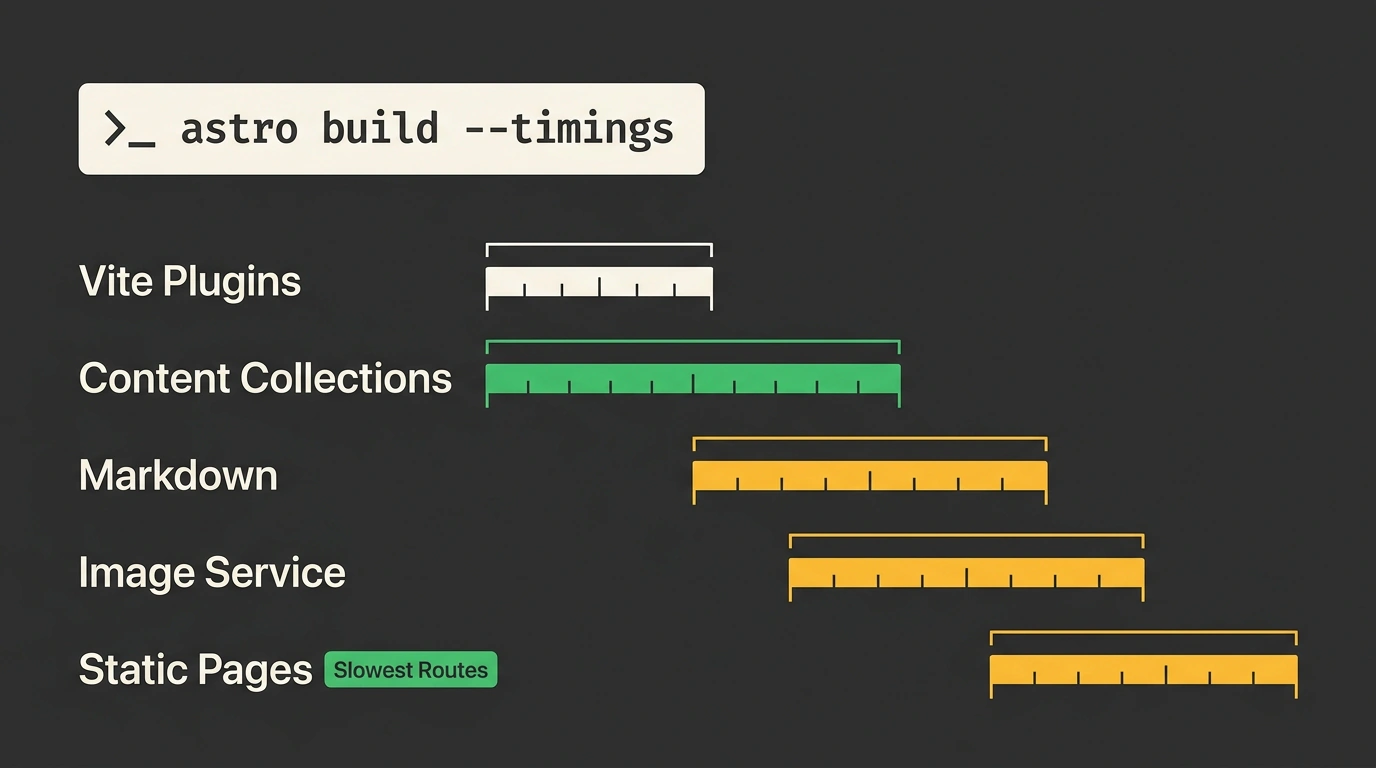
As content portals, blogs, and corporate websites built on Astro grow, Static Site Generation (SSG) build times inevitably climb. Once a codebase swells to hundreds or thousands of pages, the build process risks becoming a "black box": an endless compilation spinner rotates in the terminal while you guess what is actually slowing things down. Is it heavy Vite plugins, Zod content-collection validation, Markdown AST parsing, or slow image optimization via Sharp?
In late October 2026, developer Sarah Rainsberger unveiled the minor release Astro 7.4 on the official Astro blog. Building on the framework's trajectory from the Astro 7.3 release, the update delivers uncompromising visibility: a global --timings diagnostic flag, separate build-time and runtime media handlers, and a new notFound() handler for custom entry points.
Profiling with --timings: An X-Ray of Build Stages
The headline addition for developers of large projects is a built-in profiler enabled with a single CLI flag:
# Run a project build and print a detailed hierarchical timings table
npx astro build --timings
The performance measurement tool is integrated directly into the AstroBuild pipeline and wraps key lifecycle hooks in standard browser Performance API marks (performance.mark and performance.measure).
Once the build finishes, the console prints a detailed time breakdown across the main compilation phases:
- Vite configuration and plugins: shows the time spent initializing the build environment and running third-party transforms;
- Content Collections validation: measures schema checking via Zod;
- Markdown parsing and syntax highlighting: displays the cost of generating abstract syntax trees and running Shiki or Prism parsers;
- Image optimization: records the pure time spent compressing and converting graphic assets via Sharp;
- Static page prerendering: reports the total HTML generation duration and builds a dedicated top-5
Slowest Routeslist, helping you pinpoint "heavy" components right away.
What stood out to me in this output is how precisely it localizes bottlenecks: if a single page hits a slow external GraphQL API or runs a heavy SQL query in its frontmatter, you immediately see its name in the slowest routes list instead of digging through logs by hand.
Splitting image.service: A Diet for Serverless Functions
The second major architectural improvement in Astro 7.4 targets artifact size optimization in hybrid and server-rendered (SSR) projects.
Previously, developers declared an image processing service globally: if a project used the powerful C++ package Sharp, its compiled binaries were bundled into both static generation and serverless functions on AWS Lambda, Cloudflare Workers, or Vercel Edge. That bloated the serverless bundle by 20–30 megabytes, causing noticeable Cold Start delays.
In Astro 7.4, the image.service configuration object lets you configure handlers independently for build time (build) and runtime (runtime):
// astro.config.mjs: independent configuration of image processing services
import { defineConfig, passthroughImageService } from 'astro/config';
import node from '@astrojs/node';

export default defineConfig({
  output: 'hybrid',
  adapter: node({ mode: 'standalone' }),
  image: {
    service: {
      // During static build, use local Sharp for maximum compression
      build: {
        entrypoint: 'astro/assets/services/sharp',
        config: {
          limitInputPixels: true,
        },
      },
      // At SSR runtime, skip heavy computation and serve original URLs
      runtime: passthroughImageService(),
    },
  },
  experimental: {
    // Enable multi-threaded page generation across all CPU cores
    parallelPrerender: true,
  },
});
Thanks to this split, static graphics are compressed at maximum quality on the developer's machine or in CI, while the server container stays lean and boots in milliseconds.
Programmatic notFound() Handler in API Endpoints
Before 7.4, when building custom API Routes or integrating Astro with microservice HTTP servers (like Hono or Fastify), returning a standard 404 error was awkward: sending flat JSON felt clunky, while rendering a custom 404.astro page required workarounds with manually importing layout components.
Astro 7.4 introduces a declarative notFound() handler right on the route context:
// src/pages/api/posts/[slug].ts: programmatically returning the native 404 page
import type { APIRoute } from 'astro';
import { getPostBySlug } from '../../../lib/db';

export const GET: APIRoute = async ({ params, notFound }) => {
  const post = await getPostBySlug(params.slug);

  if (!post) {
    // Triggers a full render of 404.astro while preserving headers and styles
    return notFound();
  }

  return new Response(JSON.stringify(post), {
    status: 200,
    headers: { 'Content-Type': 'application/json' },
  });
};
Experimental Parallel Prerendering
For truly large content sites with tens of thousands of pages, Astro 7.4 introduces experimental multi-threading via the experimental.parallelPrerender flag.
Instead of rendering pages sequentially on the main Node.js thread, the framework spins up a pool of background Worker Threads, distributing the static route queue evenly across all available CPU cores. On modern 8- and 16-core workstations and CI runners, this cuts total compilation time for large sites by 2–4x without changing template logic.
Rounding out the release are Custom Redirect Pages: whereas Astro previously generated default HTML with a <meta http-equiv="refresh"> tag, developers can now plug in their own branded redirect page template with custom headers and loading animations.
Astro 7.4 clearly demonstrates the platform's maturity: the core team focused not on fleeting hype, but on deep, practical optimization tools that give engineers full control over the speed and resources of their web applications.