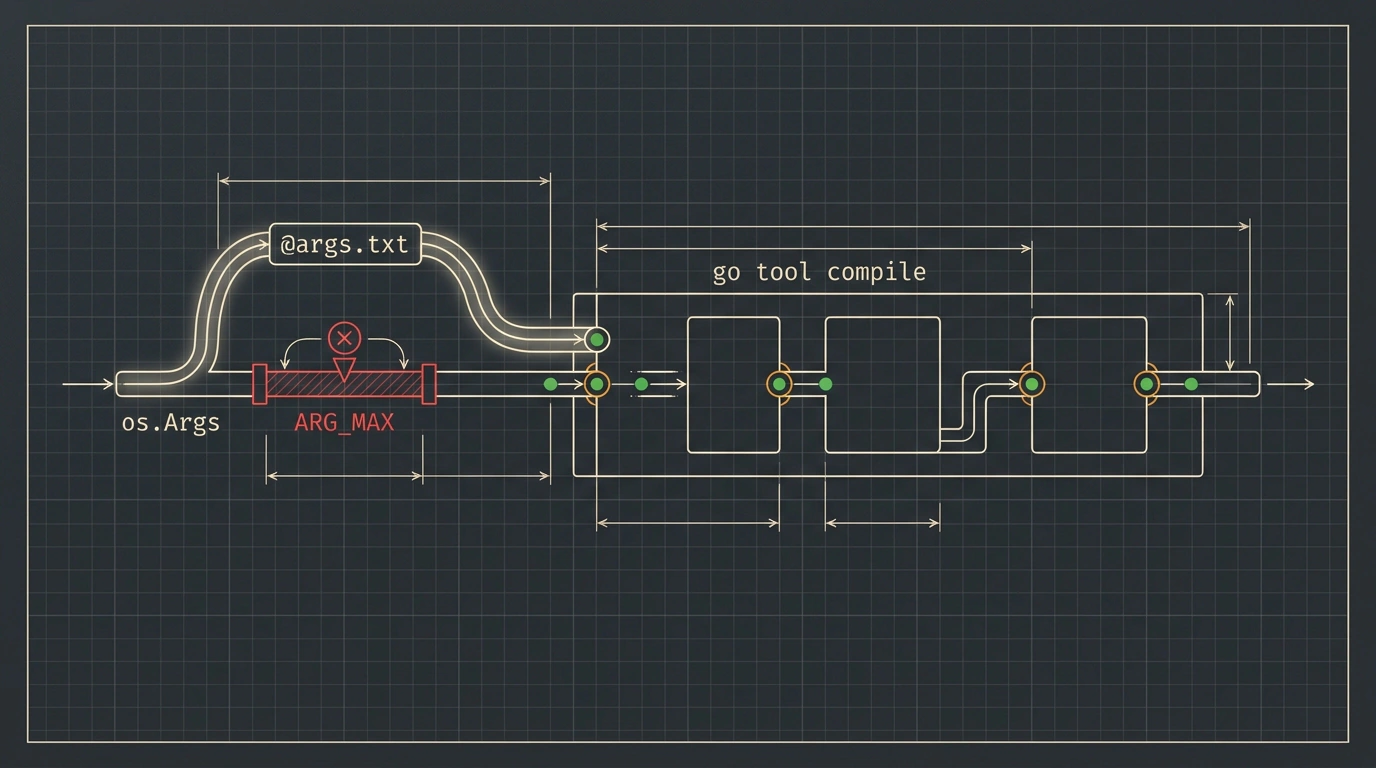
When you compile a small service in your terminal, the process feels monolithic: type a short command, get a binary a second later. Behind the scenes of a large build, though, a very different machine is running. External build pipelines in huge repositories invoke the low-level compiler directly and hand it hundreds of source paths, import tables, and optimization flags on a single command line.
Eventually, a project grows big enough that adding one more package crashes the build before compilation even starts: the operating system refuses to launch the process because the argument list exceeds its length limit. While reading the August release notes for Go 1.27, a clean fix for this long-standing headache caught my attention: core toolchain utilities now accept argument files via the @file prefix. Let's look at why the OS blocks long commands, how the new mechanism works, and how direct compiler calls differ from top-level builds.
The ARG_MAX Ceiling and the Underbelly of Large Builds
Why would a server with tens of gigabytes of RAM run out of room for a long string of flags? The paradox is that free memory has nothing to do with it—the limit is baked into the system call that spawns a process.
Picture a narrow warehouse pickup window where a dispatcher tries to rattle off ten thousand SKU codes and shelf addresses in a single breath. No matter how spacious the warehouse is, that window has a fixed bandwidth. In operating systems, the argument and environment buffer plays the role of that window. On Linux and macOS, its size is governed by ARG_MAX, ranging from tens of kilobytes up to 2 MB depending on kernel and stack settings. Overflow that buffer, and the kernel throws E2BIG: Argument list too long. On Windows, CreateProcess hits a wall even sooner—the command line caps out at 32,767 characters.
In an enterprise monorepo with thousands of packages, hitting that barrier is easy. The build orchestrator passes library search paths (-I), dependency configs (-importcfg), the package name (-p), and a list of hundreds of .go files. Previously, engineers had to work around the ceiling with hacks: generating wrapper scripts, artificially splitting packages, or writing intermediate binaries—all of which complicated CI/CD and slowed down builds.
Six Go 1.27 Toolchain Tools and How @file Works
Instead of shouting thousands of parameters through a narrow syscall window, you can just hand the clerk a printed manifest. In systems programming, that manifest is called a response file, and in the Go toolchain version 1.27, it's now first-class.
It works on two principles:
- Expanding into the argument array at startup. Any parameter prefixed with
@(such as@args.txt) is recognized as a file path. On startup, the tool reads the file and expands its contents intoos.Args. To the OS kernel, the command stays tiny, while inside the process the compiler sees the full set of flags. - GCC response-file compatibility. The parser follows the GCC compiler's response-file specification. External polyglot build systems can feed flags to the Go toolchain using their existing export machinery without rewriting generators.
Support for @file landed in six Go 1.27 build-pipeline utilities:
| Tool | Invocation | Pipeline Role |
|---|---|---|
compile | go tool compile @file | Compiles .go source files into .o object files |
link | go tool link @file | Links object files into an executable binary |
asm | go tool asm @file | Translates .s assembly files into object code |
cgo | go tool cgo @file | Generates bindings for C library calls |
cover | go tool cover @file | Instruments and analyzes test coverage profiles |
pack | go tool pack @file | Packs object modules into .a archives |
Covering all six closes bottlenecks at every stage: link and pack receive artifact lists just as massive as compile does.
Handling Spaces in Paths and Where @file Doesn't Apply
In real projects, file paths often contain spaces. Let's check how the @file parser handles them using an example from the Go Developer's Library channel, tested on Go 1.27.3.
Let's create a minimal source file source dir/main.go inside a directory with a space, put the target object file -o "object output.o" and path "source dir/main.go" into args.txt, and run the compiler:
# Source file source dir/main.go:
# package demo
# func Double(x int) int { return x * 2 }

# Contents of args.txt:
# -o "object output.o"
# "source dir/main.go"

go tool compile @args.txt
When go tool compile @args.txt runs, the parser splits parameters on spaces, tabs, and newlines while preserving spaces inside double quotes ("object output.o" and "source dir/main.go"), writing the compiled demo package to object output.o on disk. Along with single and double quotes, argument files support escape sequences (\n, \t, \\, \") and line continuations with a trailing backslash \.
The @file syntax only works when calling low-level tools directly via go tool <utility>. Top-level go build @args.txt rejects the file because go build itself acts as the build orchestrator.
That split comes straight from Go's pipeline architecture, and to me it's a very sensible engineering trade-off. In day-to-day work, I run go build, which resolves the package graph itself and invokes compile under the hood—there's no reason to hand-assemble lists of thousands of files there. External generators in monorepos bypass the top-level wrapper and drive go tool compile directly, and in Go 1.27 they finally get a clean parameter channel free of OS limits.
The August release also polished everyday tools: go mod tidy automatically merges scattered require blocks in go.mod into two sections while preserving comments, and go doc now understands version queries like pkg@v1.2.3 and the -ex flag. For more highlights, read our breakdowns of how the stdversion analyzer in go test protects package compatibility and what Go 1.27 delivered with generic methods, the uuid package, and up to 30% faster small-object allocations.
If your CI scripts or code generators build large projects with direct go tool compile and go tool link calls, moving arguments into @args.txt permanently eliminates command-line overflow crashes. Check out the full release notes and neighboring stories on the site to put all of Go 1.27's updates to work.