In the Terminal-Bench 4.1 command-line benchmark, the lightweight gemini-4-hydrogen model scored 57% compared to 18.2% for its predecessor, Gemini 3.8 Flash—a more than threefold jump in console tasks while cutting fabricated facts by over five times. For me, that number from Google's report was the biggest surprise of the release: it breaks the old rule where fast responses always meant shallow logic, and thoughtful analysis meant waiting around for a sluggish flagship.
On November 12, Google retired the Flash brand for its fourth-generation models and made Hydrogen the default engine across its flagship products—from Google AI Mode in Search and the Gemini app to Google AI Studio and the Google Antigravity agentic development environment. Let's look at why Google swapped out the familiar Flash lineup for Hydrogen in Search, and how this compact model handles complex workloads without giving up speed.
Elements Instead of Flash: Where Hydrogen Fits in the Gemini 4 Family
Dropping the Flash name isn't just a cosmetic rebrand for a chemistry metaphor. In the fourth generation, Google built a hierarchy modeled on the periodic table, where an element's weight reflects the kind of workload it's built for. At the top sit the heavy flagships: security-focused Gemini 4 Carbon and high-precision Gemini 4 Argon, which handle deep architectural planning, complex math, and long autonomous loops.
Older "light" models worked like a rushed courier: they'd dash back with a short summary, then lose the thread on a five- or six-step reasoning chain. As Google noted in its architectural announcement, Hydrogen—the lightest element—wasn't engineered as a stripped-down draft model, but as a high-speed executor for agentic workflows, coding, and live search.
At the same time, it keeps the full "working memory" of its larger siblings: a unified 1,000,000-token context window with the ability to generate up to a million output tokens via continuation mode. You can drop an entire folder of documentation and source code into a single session without chunking it up. Pricing in the Gemini API and AI Studio stays flat across the entire window: $1.50 per million input tokens and $7.50 per million output tokens. And because it follows instructions so tightly, Google partners saw a 12–23% drop in token consumption on data and graph-processing tasks.
Four Gears for the Brain: Thinking Budget and the Duel with Argon
You're probably wondering how one lightweight model can answer search queries in a blink and still go toe-to-toe with heavyweights on logic. The secret is a configurable thinking budget that works like a car's transmission. You don't need four-wheel low gear on a flat highway, but you definitely want it on a steep climb.
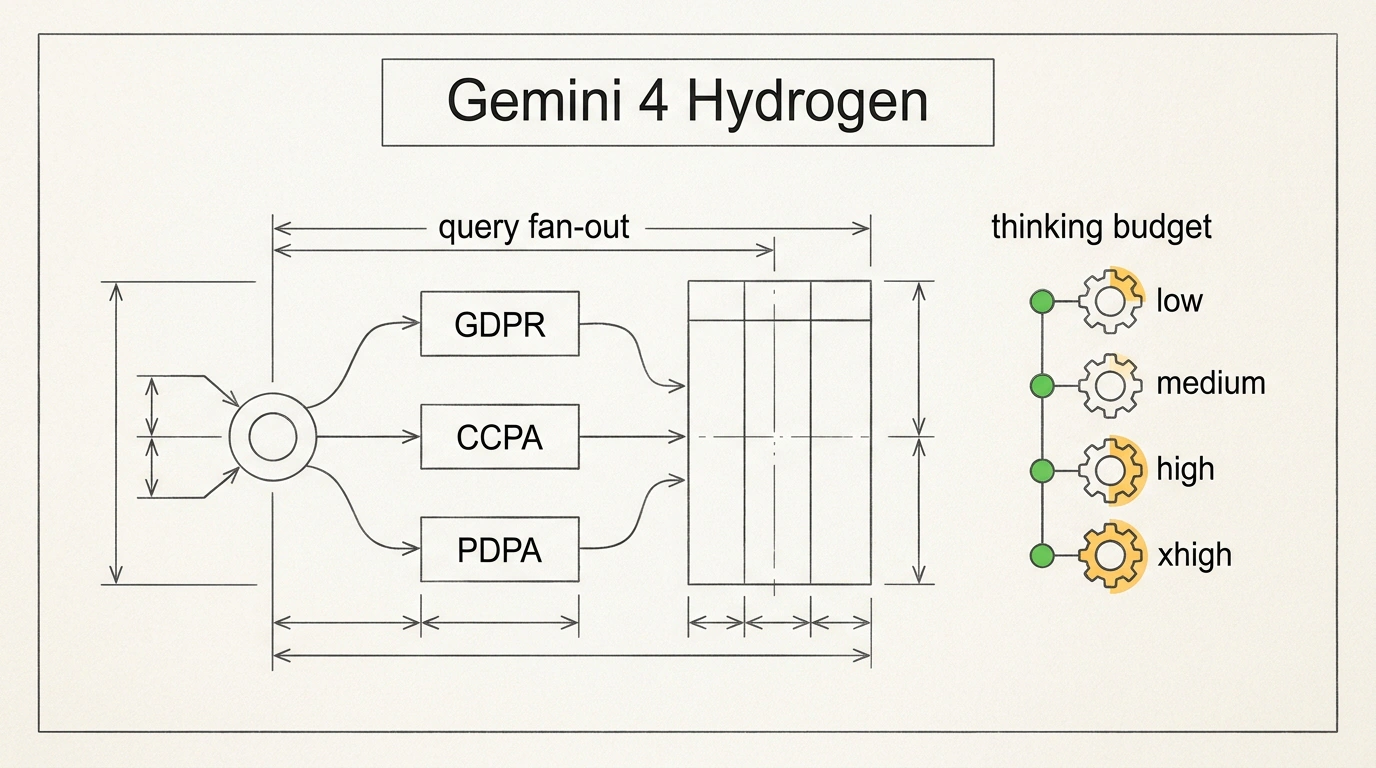
In AI Studio and the API, you get four discrete thinking levels: low, medium, high (the default), and xhigh for maximum rigor. Time-To-First-Token (TTFT) is 2.5x faster than Gemini 3.8 Flash at comparable context sizes. Yet cranking up the gear unlocks deep verification: on the independent Artificial Analysis Intelligence Index, Hydrogen scores 51 at the standard level—edging out the heavy Gemini 4 Argon (50)—and climbs to 54 on xhigh.
Let's compare both approaches on a real search task: cross-referencing biometric data storage regulations across the EU (GDPR), California (CCPA), and Singapore (PDPA) and pulling violation fines into a single table. On Gemini 4 Argon, building a thorough answer takes 14.2 seconds as it churns through its reasoning tree. Meanwhile, Gemini 4 Hydrogen in Google AI Mode at medium delivers the initial card structure in 1.8 seconds and finishes the full comparison table with validated legal citations in 5.6 seconds, maintaining 100% citation accuracy.
Still, extra depth comes with a direct price tag. In a test by automation practitioner Julian Goldie, compiling a weekly agency funnel report at low took 8 seconds and 1,456 tokens. Running the exact same prompt at xhigh took 15 seconds and burned 3,277 tokens—more than doubling the bill on a routine summary that the lowest setting already nailed without errors.
Query Fan-Out in Google AI Mode: Building Answers and Tables on the Fly
That knack for pulling together laws and figures across three jurisdictions is exactly why Google's Head of Search, Robby Stein, made Hydrogen the default model in Google AI Mode for everyone. When you type a multi-part query—even with typos and casual phrasing—it triggers query fan-out.
Picture a subway map where your question is the central hub. Instead of running one linear search, Hydrogen splits the prompt into parallel branches (EU GDPR rules, California CCPA standards, Singapore PDPA requirements, and penalty schedules) and scans web pages, tables, and images across every track simultaneously. The result—links and a structured table included—appears with zero UI lag. For site owners, that means a simple rule of thumb: Search AI pulls from pages that put a crisp two-sentence answer right under a heading and organize facts into clean tables.
Architect and Sprinter in One Harness: The Orchestrator Router in Google Antigravity
Inside the Google Antigravity agentic environment, Hydrogen runs both solo and behind the dynamic Orchestrator router, which pairs flagship planning with Hydrogen-speed execution:
- Planner (Argon or Carbon): opens the project in read-only mode, maps the architecture, and writes a step-by-step plan.
- Executor (Hydrogen): writes and edits code against the plan, installs packages, runs terminal tests, and launches the browser verification agent.
- Escalation on snags: if the executor hits a non-trivial failure, the router hands the task back to the senior model to adjust the plan.
According to Google's benchmarks, the Orchestrator pairing matches Carbon's problem-solving accuracy while saving 24% of request quota and running 19% faster. In Goldie's hands-on test, this duo built and browser-verified an interactive three-file onboarding portal totaling 3,800 lines of code in 9 minutes with zero console errors—and solo Hydrogen fixed a broken lead-scoring repo in 2 minutes 11 seconds, taking its test suite from zero to 7 out of 7 passing.
In Google AI Studio and the API, don't leave the default high setting on for simple jobs: switch template summaries and email triage to low or medium. And when building in Antigravity, keep one task per chat and end your prompt by asking the built-in browser agent to verify the result.
Where Speed Yields to Depth: Honest Limits and Routing Rules
Even with 96.7% honesty in internal agentic evals, an 81% drop in unnecessary code edits, and 2.3x stronger protection against indirect prompt injection, Hydrogen is still a sprinter, not a theoretical mathematician. Stretch a single chat across unrelated tasks past 40% of the context window, and detail retention starts to slip.
To get the most out of the Gemini 4 lineup, route tasks by tier:
lowandmedium: web search, comparison tables (like the GDPR/CCPA/PDPA breakdown), data classification, formatting, and rapid code iterations.highandxhigh: hunting down subtle bugs (such as race conditions on a double-clicked form) and reviewing long documents up to a million tokens.- Argon and Carbon: deep mathematical proofs, unconventional multi-layered algorithms, and designing complex systems from scratch.
Moving from Flash to Gemini 4 Hydrogen replaces the old "fast-but-shallow vs. smart-but-slow" trade-off with a single flexible tool—one where you dial speed and verification depth to match the exact value of the task.