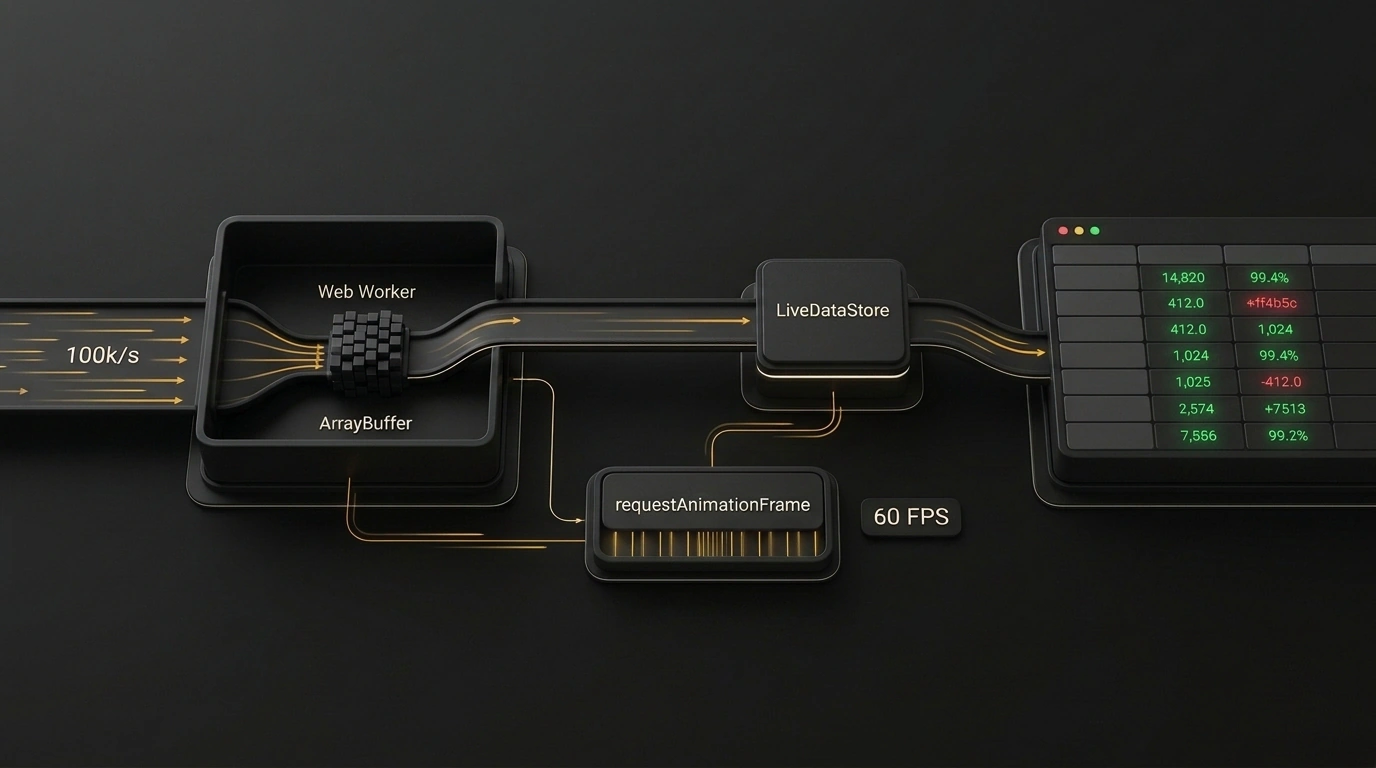
Picture a classic high-load fintech or monitoring scenario: a browser tab renders a 100,000-row table, and live quotes pour in over a WebSocket—batches of 5,000 deltas every 50 milliseconds. That adds up to 100,000 field updates per second. Meanwhile, the UI has to stay silky smooth: 60 FPS scrolling, instant click response, zero freezes.
Try solving that with standard React tools—shoving data into useState, Redux Toolkit with Immer, or Zustand—and the browser tab locks up solid within the very first second after connecting.
In a practical deep dive on Habr, author rusaleffa dissects why standard state management collapses instantly and shows how a three-tier architecture with Web Workers saves UI performance.
Anatomy of a Collapse: Why useState and Redux Choke the Browser Main Thread
In the browser, JavaScript runs on a single Main Thread. That thread shares CPU time across script execution, style recalculation, and frame painting—leaving a strict 16.6 ms per frame budget for 60 FPS.
When a batch of 5,000 JSON objects hits the Main Thread, three things go wrong at once:
- Parsing lockup: Running
JSON.parseon a text payload that size takes 30 to 70 ms, freezing the UI cold. - Garbage collector pauses: Redux and React expect fresh immutable object copies on every update (
{ ...item, price }). Allocating 100,000 objects per second floods the heap. The garbage collector triggers a Major GC, stalling the thread for hundreds of milliseconds. - Cascading re-renders: Mutating global state forces React to reconcile the Virtual DOM tree across thousands of selectors.
Binary Protocol and Offloading Network Parsing to a Dedicated Web Worker
Step one is kicking network work and parsing off the Main Thread by opening the WebSocket inside a background Dedicated Web Worker.
Step two is ditching text JSON for a compact binary layout using ArrayBuffer and DataView. Each delta packs into just 16 bytes: 4 bytes for id, 8 bytes for price, and 4 bytes for volume. Network traffic drops 3–4x.
The worker ingests the binary stream and hands the buffer straight to the Main Thread:
// worker.js - background telemetry processing thread
let socket = null;

self.onmessage = (event) => {
  if (event.data.type === 'CONNECT') {
    socket = new WebSocket(event.data.url);
    socket.binaryType = 'arraybuffer';

    socket.onmessage = (event) => {
      if (event.data instanceof ArrayBuffer) {
        // Transfer the buffer to the Main Thread via Zero-Copy (Transferable Objects)
        // Memory is not cloned—ownership transfers by pointer!
        self.postMessage({ type: 'BATCH_UPDATE', buffer: event.data }, [event.data]);
      }
    };
  }
};
Passing [event.data] as the second argument to postMessage activates Transferable Objects: the browser doesn't copy a single byte, transferring memory ownership from the worker to the Main Thread in zero time (Zero-Copy).
Zero-Copy via Transferable Objects and a Mutable Store Outside React
On the Main Thread, we drop immutable object cloning altogether. All 100,000 rows live in a native JavaScript Map outside React's context.
Updates mutate entries in place and bump a per-row version counter:
// store.ts - high-performance store outside the component tree
export interface DataItem {
  id: number;
  price: number;
  volume: number;
  version: number;
}

type Subscriber = (version: number) => void;

export class LiveDataStore {
  private data = new Map<number, DataItem>();
  private subscribers = new Map<number, Set<Subscriber>>();
  private pendingUpdates = new Set<number>();
  private rafScheduled = false;

  public applyBinaryBuffer(buffer: ArrayBuffer) {
    const view = new DataView(buffer);
    const count = view.byteLength / 16;

    for (let i = 0; i < count; i++) {
      const offset = i * 16;
      const id = view.getInt32(offset, true);
      const price = view.getFloat64(offset + 4, true);
      const volume = view.getInt32(offset + 12, true);

      const entity = this.data.get(id);
      if (entity) {
        entity.price = price;
        entity.volume = volume;
        entity.version++;
        this.pendingUpdates.add(id);
      }
    }

    this.scheduleBatchFlush();
  }

  private scheduleBatchFlush() {
    if (this.rafScheduled) return;
    this.rafScheduled = true;

    requestAnimationFrame(() => {
      this.pendingUpdates.forEach((id) => {
        const entity = this.data.get(id);
        const subs = this.subscribers.get(id);
        if (entity && subs) {
          subs.forEach((cb) => cb(entity.version));
        }
      });
      this.pendingUpdates.clear();
      this.rafScheduled = false;
    });
  }

  public subscribe(id: number, cb: Subscriber) {
    if (!this.subscribers.has(id)) {
      this.subscribers.set(id, new Set());
    }
    this.subscribers.get(id)!.add(cb);
    return () => this.subscribers.get(id)?.delete(cb);
  }
}
Never trigger a render on every incoming network packet. Queue deltas up and flush changes strictly once per frame via requestAnimationFrame.
Syncing with requestAnimationFrame and Row Virtualization
On screen, a virtualizer renders only the 30–50 table rows currently visible in the viewport.
Each row component subscribes via useSyncExternalStore strictly to its own id. When row #42 mutates in the store, only that single component receives the notification and repaints two numbers on screen. The other 99,999 rows don't even wake up.
The payoff is huge: the background Web Worker handles socket traffic on a separate core, the mutable store eliminates GC pauses, and React cruises at 60 FPS under 100,000 updates per second.
