If you've ever had to set up remote desktops for engineers or contractors, you know the nightmare all too well. Traditional VDI platforms like Citrix or VMware Horizon cost a small fortune, demand dedicated virtualization servers, and come with Byzantine licensing. Meanwhile, all an engineer actually wants is a clean graphical dev environment where they can run tests quickly without dragging proprietary source code onto a personal laptop.
The open-source WaaS (Workspace-as-a-Service) platform from the XoRHub team takes a cloud-native look at virtual desktops. If your company is already running a Kubernetes cluster, why build a separate zoo of servers next to it? WaaS turns spinning up graphical workspaces into a declarative routine: an environment is defined with a standard Custom Resource Definition (CRD) manifest, and the user connects to their remote desktop straight from a browser tab.
Hard-Boundary Architecture: Why the Operator Never Sees the Database
The WaaS authors built the system around strict hard boundaries, ensuring no single component holds excessive privileges.
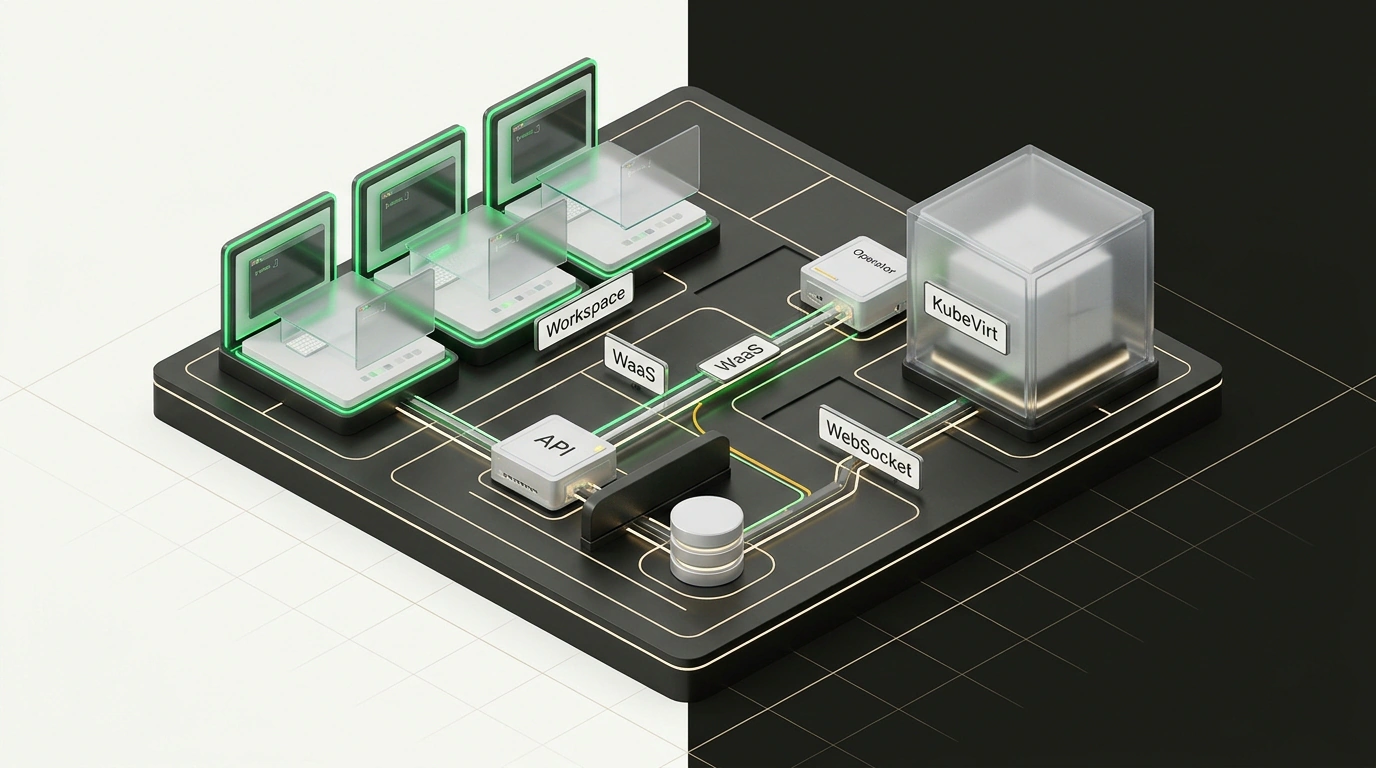
At the heart of the system sits the WaaS Operator, written in Go using Kubebuilder. It watches Workspace and WorkspaceTemplate resources under the waas.xorhub.io domain. Here is the key design choice: the operator talks exclusively to the Kubernetes API Server. It has zero network access and no credentials to the PostgreSQL database storing user profiles and settings. Even if an attacker compromises the operator, they cannot reach organizational data.
The platform's API Server handles UI requests and authentication (supporting both local users and corporate SSO via OIDC). Yet it never spawns pods directly—resource allocation happens strictly by creating CRDs in the Kubernetes API under cluster RBAC control.
Session traffic is isolated through a pairing of the wwt proxy and the Apache Guacamole daemon (guacd). The wwt gateway terminates the WebSocket connection and verifies the JWT token before opening a TCP connection to guacd. The guacd service itself runs as a ClusterIP service, completely sealed off from the external network.
Containers for Linux, KubeVirt VMs for Windows
WaaS splits OS execution according to the job at hand:
- Linux workspaces: For Ubuntu or Alpine, it spins up a container with an X11/Wayland server and a VNC web gateway. The
/homedirectory is mounted on a PersistentVolumeClaim (PVC) volume. The container boots in seconds and makes use of spare cluster nodes. - Windows workspaces: When specialized Windows tooling is required, WaaS brings in the KubeVirt operator. Instead of a container, it generates a virtual machine spec with native RDP protocol forwarding.
For developer workspaces, make sure to configure automatic hibernation: the WaaS operator can tear down compute pods outside working hours while preserving state on persistent PVC volumes.
Deploying the Chart and Creating Your First Workspace
Installing the platform requires a Kubernetes 1.28+ cluster with cert-manager already in place.
You deploy the platform via its official Helm chart:
# Install the WaaS platform into an isolated namespace
helm install waas ./helm/waas \
  --namespace waas-system \
  --create-namespace \
  --set ingress.enabled=true \
  --set ingress.host="waas.corp.example.com" \
  --set postgresql.persistence.size=20Gi
Once the chart is applied, admins or GitOps pipelines can declaratively define employee workspaces using a manifest:
apiVersion: waas.xorhub.io/v1alpha1
kind: Workspace
metadata:
  name: dev-desktop-ivan
  namespace: waas-workspaces
spec:
  template:
    os: linux
    image: "registry.corp.example.com/waas/ubuntu-desktop:24.04"
    resources:
      limits:
        cpu: "4"
        memory: "8Gi"
      requests:
        cpu: "1"
        memory: "2Gi"
    storage:
      homeSize: "50Gi"
      storageClassName: "fast-nvme"
  userRef:
    username: "ivan.petrov"
When the manifest hits the cluster, the operator creates a StatefulSet backed by the fast-nvme volume and exposes the connection endpoint in the React 19 UI. The developer opens https://waas.corp.example.com and lands inside a desktop with a terminal and IDE in a single click.
Where Kubernetes-Based VDI Shines—and Where It Adds Friction
Moving workspaces into Kubernetes is a smart move for teams tired of wrangling scattered VMs who want to centralize security. Source code stays inside the protected perimeter, NetworkPolicy rules restrict workspace access to internal databases, and audit logs capture exact session durations. That said, if your infrastructure hasn't outgrown simpler setups yet, it's worth revisiting our piece on Migrating from Kubernetes to AWS ECS Fargate, where we looked at cutting operational overhead by stepping away from overbuilt clusters.
Still, WaaS comes with natural trade-offs:
- Latency sensitivity: Streaming graphics over WebSocket requires a steady link with round-trip time (RTT) under 40–50 ms.
- Storage demands: A fast NVMe StorageClass is mandatory; otherwise disk-heavy operations in an IDE will crawl.
If you already have a live Kubernetes cluster in your stack, WaaS is well worth a spin just to see how quickly you can stand up a locked-down dev environment today without writing a massive check for VDI licenses.