Sooner or later, every successful project hits a data growth wall. Your startup or service launched on a single PostgreSQL or MySQL box, the orders or audit-log table happily held its first few hundred thousand rows, and queries returned in a couple of milliseconds.
Months of real traffic later, that table swells to a hundred million rows, disk files pass hundreds of gigabytes, and users start complaining about sluggish analytics reports. At the next architecture review, two buzzwords inevitably fly across the table: "Let's partition it!" or "We need sharding right now!"
In engineering debates, people often lump these two concepts together as if they were interchangeable. In reality, a fundamental boundary separates them—the boundary of physical hardware. Making the wrong call here can either tank database performance or lock your team into months of painful, unnecessary re-architecture.
Let's break down this fork in the road and draw the exact line between partitioning and sharding.
The Physical Boundary: One Server vs. a Cluster
The real difference isn't in SQL syntax—it's in how physical hardware resources (CPU, RAM, and disk I/O) are distributed:
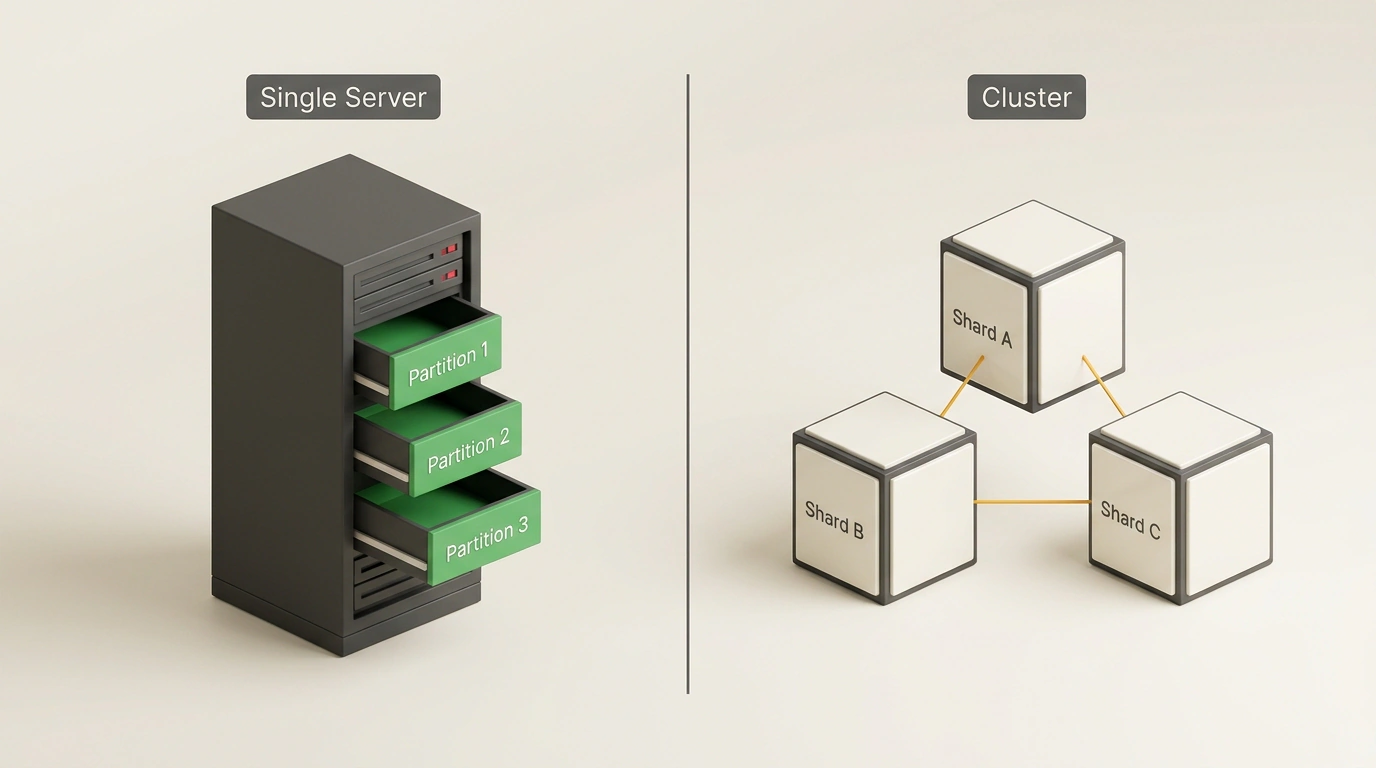
Architectural comparison of table partitions on a single server versus independent servers in sharding.
- Partitioning splits one logical table into multiple physical sub-tables (partitions) inside a single DBMS instance on one server. Every partition shares the same memory space and competes for the same CPU cores and disks.
- Sharding distributes a dataset across multiple independent physical servers (cluster nodes). Each shard is its own standalone database with its own RAM, storage, and operating system (a Shared-Nothing architecture).
Notice the difference: partitioning helps the OS and query planner work more efficiently with local files on one host, while sharding scales a system past the physical limits of a single machine.
Partitioning: Three Big Problems It Solves
Why is partitioning so popular if all the data still sits on one server? Because it neatly cures three major headaches of growing monolithic databases:
1. Keeping Indexes Inside RAM
As long as a table's indexes fit in memory, B-Tree lookups take nanoseconds. Once an index outgrows server RAM, performance falls off a cliff: the DBMS has to evict hot cache pages and hit slow disk for every lookup. Split the table into monthly partitions, and your active working set (the current month) shrinks dramatically. This month's index stays comfortably in RAM, and disk I/O drops near zero.
2. Partition Pruning
When you filter a query by the partition key (such as a date range), the query planner eliminates irrelevant partitions during planning. The database never even opens the files for other months.
3. Instant Data Cleanup Without VACUUM
This is the real secret behind high-load database operations. Suppose you need to delete two-year-old rows from an orders table. Run DELETE FROM orders WHERE order_date < '2024-01-01';, and your database stalls for hours: it marks millions of rows as dead one by one, floods the WAL with gigabytes of logs, locks tables, causes massive bloat, and leaves VACUUM churning for a day trying to reclaim disk space.
With partitioning, dropping an entire month is a single instant DDL command: DROP TABLE orders_2024_01;. The database unlinks the file at the filesystem level in milliseconds—zero WAL bloat and zero VACUUM overhead.
In Practice: Setting Up Partitioning in PostgreSQL
Here is what declarative range partitioning looks like in modern PostgreSQL:
-- Create a master table with declarative range partitioning by date
CREATE TABLE orders (
    order_id bigint NOT NULL,
    customer_id bigint NOT NULL,
    order_date date NOT NULL,
    total_amount numeric(12, 2) NOT NULL,
    status text NOT NULL,
    -- Important rule: the partition key column must be part of the primary key
    PRIMARY KEY (order_id, order_date)
) PARTITION BY RANGE (order_date);

-- Create physical partitions for specific months
CREATE TABLE orders_2026_10 PARTITION OF orders
    FOR VALUES FROM ('2026-10-01') TO ('2026-11-01');

CREATE TABLE orders_2026_11 PARTITION OF orders
    FOR VALUES FROM ('2026-11-01') TO ('2026-12-01');

-- Local indexes are created automatically or per partition
CREATE INDEX idx_orders_2026_10_customer ON orders_2026_10 (customer_id);
Now let's verify partition pruning using EXPLAIN:
EXPLAIN SELECT * FROM orders
WHERE order_date >= '2026-10-15' AND order_date <= '2026-10-20';

-- Output in EXPLAIN:
-- Seq Scan on orders_2026_10 orders (cost=0.00..25.40 rows=12 width=48)
--   Filter: ((order_date >= '2026-10-15'::date) AND (order_date <= '2026-10-20'::date))
-- Notice: the planner didn't even touch orders_2026_11!
When Partitioning Isn't Enough: Enter Sharding
Partitioning works wonders, but it still hits a hard ceiling when a single server runs out of headroom:
- Write bottleneck: Read replicas scale reads easily, yet every
INSERTandUPDATEstill goes through one primary node. Once incoming writes saturate that machine's disk IOPS or bus bandwidth, one box simply can't keep up. - Physical disk capacity: When your dataset hits tens of terabytes, it stops fitting comfortably on a single server's storage array.
That's when sharding steps in. You slice data by a shard key (such as a hash of user_id) and spread it across ten independent servers, so each node only handles a tenth of the write load.
Sharding solves write scaling, but it charges a steep complexity tax:
- Loss of referential integrity: You can no longer declare native
FOREIGN KEYconstraints between tables living on different shards. - Distributed transactions: Moving money atomically between users on separate shards requires two-phase commit (2PC), which is painfully slow and fragile under network hiccups.
- Routing coordinator: Your app now needs middleware (like Citus or Vitess) to figure out which server owns each incoming query.
The Golden Rule: Start Simple, Scale Deliberately
Before jumping into sharding and spending months rewriting business logic:
- Squeeze everything you can out of indexes, query tuning, and vertical scaling (a modern 128-core server with a terabyte of RAM costs far less than an engineering team maintaining a sharded cluster).
- Set up partitioning on your largest tables by timestamp or status—that solves 90% of disk I/O and cache-churn issues.
- Only move to sharding when write throughput genuinely hits the physical ceiling of one beefy server.
In mature high-load systems, both techniques work side by side: tables on each individual shard are still partitioned by month.